EducationSoftwareStrategy.com
StrategyCommunity

Knowledge Base

Product

Community

Knowledge Base

TopicsBrowse ArticlesDeveloper Zone

Product

Download SoftwareProduct DocumentationSecurity Hub

Education

Tutorial VideosSolution GalleryEducation courses

Community

GuidelinesGrandmastersEvents
x_social-icon_white.svglinkedin_social-icon_white.svg
Strategy logoCommunity

© Strategy Inc. All Rights Reserved.

LegalTerms of UsePrivacy Policy
  1. Home
  2. Topics

KB45871: An error message is displayed in MicroStrategy Analytics when Derived Elements defined on multiple datasets are referenced in a Report Writing Document (RWD) joined grid


Community Admin

• Strategy


This article notes an error that can occur when derived elements are on multiple joined datasets

When executing a Report Writing Document (RWD) such as a Report Services document or a dashboard with one or more Derived Elements that are defined on different datasets, users may see a message saying: “Join Derived Elements from different reports are not supported” in Strategy Analytics. This behavior is by design.
 
If a Derived Element defined on different datasets merge together in one RWD grid, the expected results can be misinterpreted or are incorrect. Hence, the Analytical Engine will fail the grid and return a message saying “Join Derived Elements from different reports are not supported”.
 
For example, create a document with the following dataset:  R01 (Year, Category, Profit) and R02 (Category, Revenue) with a Derived Element on Category:

ka04W000000Oh8KQAS_0EM440000002CTo.png


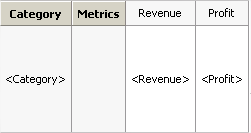
Add a grid into Detail Header with Category, Revenue and Profit.
 

ka04W000000Oh8KQAS_0EM440000002CTn.png

 
In Strategy Analytics:
When executing this document, users will see a message saying: “Join Derived Elements from different reports are not supported” in Strategy Analytics.

 

ka04W000000Oh8KQAS_0EM440000002CTq.png


Comment

0 comments

Details

Knowledge Article

Published:

June 1, 2017

Last Updated:

June 1, 2017