EducationSoftwareStrategy.com
StrategyCommunity

Knowledge Base

Product

Community

Knowledge Base

TopicsBrowse ArticlesDeveloper Zone

Product

Download SoftwareProduct DocumentationSecurity Hub

Education

Tutorial VideosSolution GalleryEducation courses

Community

GuidelinesGrandmastersEvents
x_social-icon_white.svglinkedin_social-icon_white.svg
Strategy logoCommunity

© Strategy Inc. All Rights Reserved.

LegalTerms of UsePrivacy Policy
  1. Home
  2. Topics

KB45897: Express mode is not re-applying conditional formatting when switching selector values in MicroStrategy Web 9.3.1.


Community Admin

• Strategy


Express mode is not re-applying conditional formatting when switching selector values in MicroStrategy Web 9.3.1.

SYMPTOM:
Developers may control whether certain shapes display depending on conditions by using the “Hide Image” feature while applying Conditional Formatting in Strategy Web 9.3.1. For example, a green rectangle may be configured to display when revenue exceeds $400,000 and a red rectangle may be configured to display when revenue falls below $400,000. However, users may notice that this kind of functionality does not work when the document is executed in Express Mode.
 
STEPS TO REPRODUCE:
  • Create a report in the StrategyTutorial project that contains the Year and Revenue
  • Create a document using this report as a dataset
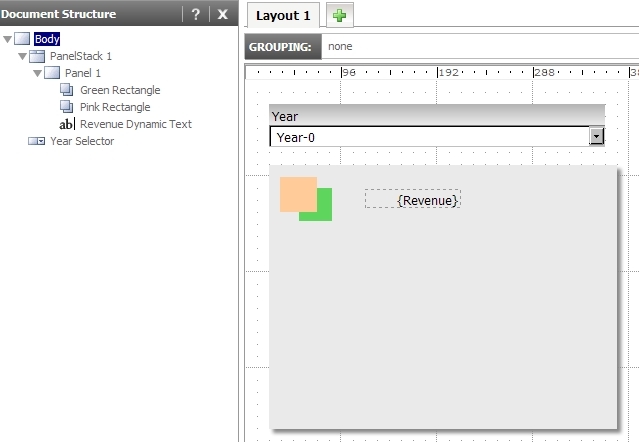
  • On a panelstack, create two rectangle objects with different fill colors
  • On the same panelstack, add a textbox with dynamic text for Revenue
  • Outside the panelstack, insert a dropdown selector that selects for Year and targets the panelstack
  • The design of the dashboard should look similar to the following:

ka04W000000OcaBQAS_0EM4400000026KT.jpeg
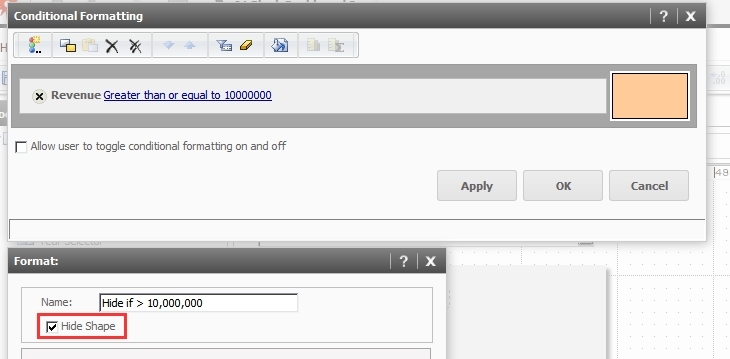
  • Set the conditional formatting for one of the rectangles to "Hide Image" if the Revenue exceeds $10,000,00 and the conditional formatting for the other rectangle to "Hide Image" if the Revenue is below $10,000,000.

ka04W000000OcaBQAS_0EM4400000026KS.jpeg
  • Execute the document in Interactive Mode. Toggle the year selector to observe that for certain years, one rectangle will be visible while the other will be hidden.
  • Now, execute the document in Express Mode. Even when the year selector is toggled, the Conditional Formatting does not appear to be applying.

CAUSE:
This is a known issue with conditional formatting in Express Mode in Strategy Web 9.3.1.
 
ACTION:
This issue has been addressed in Strategy Web 9.4.1 HF2 and above for documents executed in Express Mode. Update to this version of the product to take advantage of this fix.
 
WORKAROUND:

  1. Click the Refresh button after updating the selector in Express Mode.
  2. Execute the document in Interactive Mode.

Comment

0 comments

Details

Knowledge Article

Published:

May 3, 2017

Last Updated:

May 3, 2017