EducationSoftwareStrategy.com
StrategyCommunity

Knowledge Base

Product

Community

Knowledge Base

TopicsBrowse ArticlesDeveloper Zone

Product

Download SoftwareProduct DocumentationSecurity Hub

Education

Tutorial VideosSolution GalleryEducation courses

Community

GuidelinesGrandmastersEvents
x_social-icon_white.svglinkedin_social-icon_white.svg
Strategy logoCommunity

© Strategy Inc. All Rights Reserved.

LegalTerms of UsePrivacy Policy
  1. Home
  2. Topics

KB45899: Metadata creation fails on PostgreSQL 9.3 with MicroStrategy 9.3.1 and MicroStrategy Analytics Enterprise 9.4.1


Community Admin

• Strategy


Metadata creation fails on PostgreSQL 9.3 with MicroStrategy 9.3.1 and MicroStrategy Analytics Enterprise 9.4.1

SYMPTOM:
 
An error will be displayed when trying to create a metadata in PostgreSQL 9.3 using Strategy versions 9.3.1 and Strategy Analytics Enterprise 9.4.1. The error will be displayed for Windows and Linux Operating Systems, this error will be presented in the Strategy Configuration Wizard at the last step of the metadata creation.
 
This error displayed on Linux is as follows: 
 

ka04W000000OhkBQAS_0EM440000002JCp.jpeg


An error occurred while creating a default Metadata configuration

 
This error displayed on Windows is as follows:
 

ka04W000000OhkBQAS_0EM440000002JCm.jpeg


Error occurred during default MD configuration
 
ACTION:
 
Strategy will continue to investigate and post updates as soon as they are available.
 
WORKAROUND:
 
Workaround 1:
 
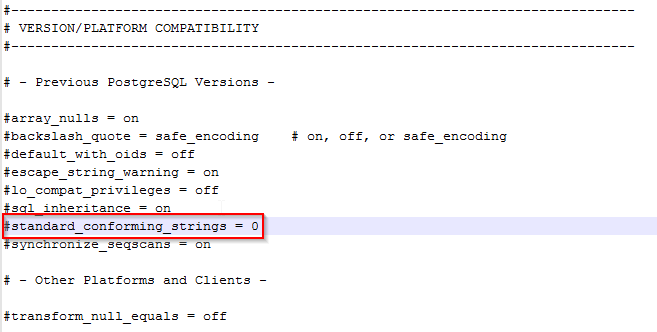
Change the server configuration (postgresql.conf) parameter “standard_conforming_strings” value to “0”. The postgresql.conf file can be found on the PostgreSQL Server machine. Once this value is changed there must be a restart of the PostgreSQL server for the changes to take effect.
 

ka04W000000OhkBQAS_0EM440000002JCq.png

 
Workaround 2:
 
Inside of the DSN, define the initialization string to be SET STANDARD_CONFORMING_STRINGS TO OFF;


Comment

0 comments

Details

Knowledge Article

Published:

April 17, 2017

Last Updated:

April 17, 2017