EducationSoftwareStrategy.com
StrategyCommunity

Knowledge Base

Product

Community

Knowledge Base

TopicsBrowse ArticlesDeveloper Zone

Product

Download SoftwareProduct DocumentationSecurity Hub

Education

Tutorial VideosSolution GalleryEducation courses

Community

GuidelinesGrandmastersEvents
x_social-icon_white.svglinkedin_social-icon_white.svg
Strategy logoCommunity

© Strategy Inc. All Rights Reserved.

LegalTerms of UsePrivacy Policy
  1. Home
  2. Topics

KB45928: How to use Question Group in Survey Widget in MicroStrategy Web 9.4.0 and Mobile 9.4.0


Community Admin

• Strategy


How to use Question Group in Survey Widget in MicroStrategy Web 9.4.0 and Mobile 9.4.0

Question Group can be used to display a group of related questions as below, where the question "Personal Info" is combination of 4 individual questions:
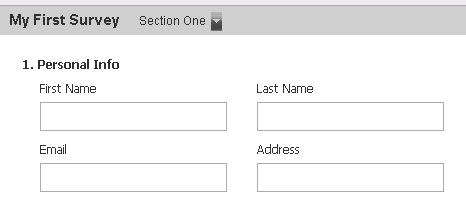
ka04W000000OgiUQAS_0EM440000002A9H.png

To enable question group, the following information must be provided, compared with the basic components in KB45567:
Section ID, Section Title, Question Number, Group Style
 
Follow the steps below to use Question Group in Survey Widget with the above effect:

  • In Survey table, add columns SectionID, SectionTitle, QuestionNumber and GroupStyle. Insert a record for QuestionTitle=Personal Info, with QuesitonType=11. Here, QuesitonType=11 means "Personal Info' will be taken as the main question. Fill in other values as below:  
ka04W000000OgiUQAS_0EM440000002A9F.png
  • Create attributes based on above new columns and include them to the report services document datasets.
  • Modify the widget properties as below:
     
ka04W000000OgiUQAS_0EM440000002A9C.png


Comment

0 comments

Details

Knowledge Article

Published:

June 12, 2017

Last Updated:

June 12, 2017