EducationSoftwareStrategy.com
StrategyCommunity

Knowledge Base

Product

Community

Knowledge Base

TopicsBrowse ArticlesDeveloper Zone

Product

Download SoftwareProduct DocumentationSecurity Hub

Education

Tutorial VideosSolution GalleryEducation courses

Community

GuidelinesGrandmastersEvents
x_social-icon_white.svglinkedin_social-icon_white.svg
Strategy logoCommunity

© Strategy Inc. All Rights Reserved.

LegalTerms of UsePrivacy Policy
  1. Home
  2. Topics

KB45940: "Object with ID xxx and type 29 (DB Instance) is not found in the metadata" error occurs when opening Warehouse Catalog in MicroStrategy Desktop 9.3.x.


Stefan Zepeda

Salesforce Solutions Architect • Strategy


This technical note describes a behavior observed when opening the Warehouse Catalog in MicroStrategy 9.3.x.

SYMPTOM:
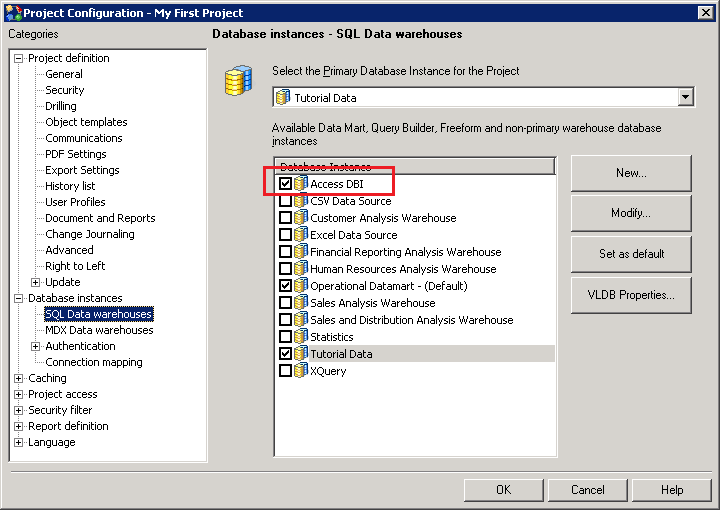
Consider that a new database instance called "Access DBI" is created in Strategy Desktop 9.3.x. Additionally, this database instance is selected for a project to be a SQL data warehouse, as shown:
 

ka02R000000kcMhQAI_0EM440000002CUU.png

 
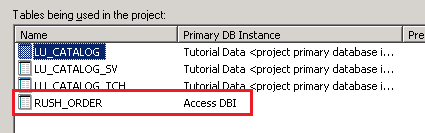
Consider that a table from this database instance is added to the project, as shown:
 

ka02R000000kcMhQAI_0EM440000002CUS.png

 
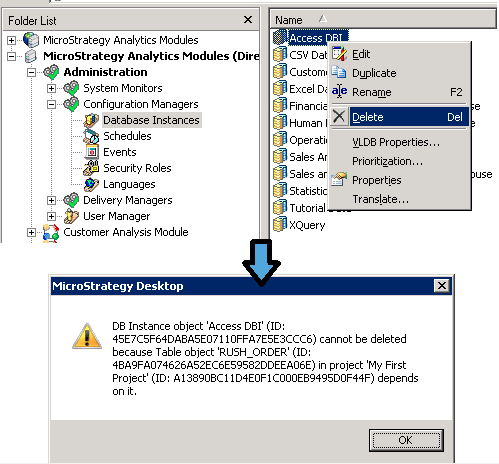
If this database instance is attempted to be deleted from Administration > Configuration Managers > Database Instances in Strategy Desktop 9.3.x, an error message comes up that it cannot be deleted due to a dependent table object as shown:


ka02R000000kcMhQAI_0EM440000002CUQ.png


DB Instance object 'Access DBI' (ID: xxxx) cannot be deleted because Table object 'RUSH_ORDER' (ID: yyyy) in project 'My First Project' (ID: zzzz) depends on it.
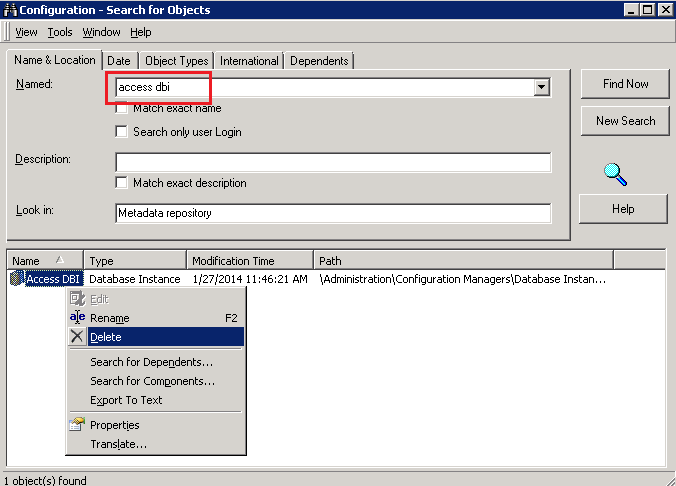
 
However, if a configuration search object is created to search for this database instance by name, users might observe they are able to successfully delete the database instance through it, as shown:
 

ka02R000000kcMhQAI_0EM440000002CUh.png

 
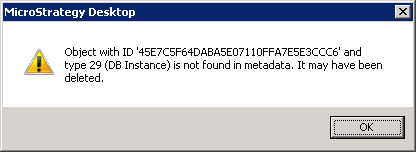
On attempting to open Warehouse Catalog for the project which had the table added through the above database instance, the following error subsequently occurs:
 

ka02R000000kcMhQAI_0EM440000002CUW.png


Object with ID 'xxxx' and type 29 (DB Instance) is not found in metadata. It may have been deleted.

 
CAUSE:
This is a known issue with Strategy Desktop 9.3.x. Deleting the database instance through configuration search does not correctly check for any dependent objects before deleting it.
 
ACTION:
Strategy Developer 9.4.x will not allow to delete the DB Instance through configuration search and there will be a dependent objects warning message. Upgrade to that version to prevent this behavior.
 
Contact Strategy Technical Support for steps to remove the invalid reference in Strategy 9.3.x.


Comment

0 comments

Details

Knowledge Article

Published:

May 5, 2017

Last Updated:

May 5, 2017