By default, all contacts are visible to all users as contacts do not have ACLs. This behavior is documented in the following Strategy KnowledgeBase technical note:
KB37912 - When a user creates a contact to subscribe to a report via email in Strategy 9.x, all users that can subscribe to the report can see that contact.
Starting in Strategy 9.3.1, users can be blocked from viewing contacts in a certain group by creating a new registry key for this feature. The following steps describes this procedure:
Note: The instructions below assume that there are 2 users - User A and User B, each a member of their respective groups - Group A and Group B. Contacts - Contact A and Contact B are created and linked to User A and User B respectively. In order to block user A from seeing Contact B in the contact browser, follow the steps below:
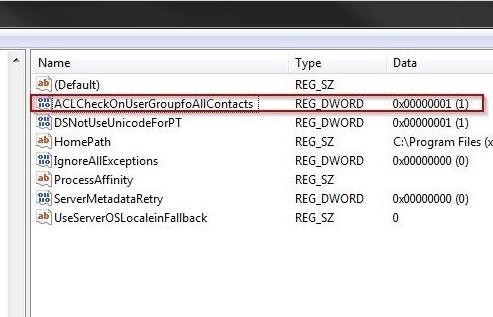
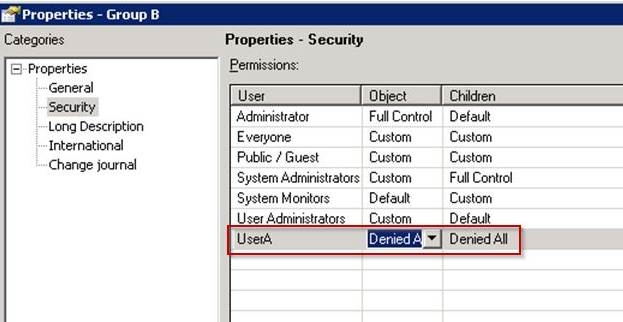
Note: If the Intelligence Server is located on a UNIX/Linux system, the registry key mentioned above should be created in the MSIReg.reg file under the key shown below. Ensure that a backup of the MSIReg.reg file is created before making the following changes:
Sample Code/Error
"ACLCheckOnUserGroupfoAllContacts"=dword:00000001
WARNING:
Modifying registry values incorrectly may cause serious, system-wide problems that may require the re-installation of Microsoft Windows NT. Any edit of the registry is done at the user's own risk. Since these are user-initiated changes, they are not covered by any Strategy warranty. If using Microsoft Windows NT, the user should backup the registry and/or update an Emergency Repair Disk (ERD) prior to alterations.
