EducationSoftwareStrategy.com
StrategyCommunity

Knowledge Base

Product

Community

Knowledge Base

TopicsBrowse ArticlesDeveloper Zone

Product

Download SoftwareProduct DocumentationSecurity Hub

Education

Tutorial VideosSolution GalleryEducation courses

Community

GuidelinesGrandmastersEvents
x_social-icon_white.svglinkedin_social-icon_white.svg
Strategy logoCommunity

© Strategy Inc. All Rights Reserved.

LegalTerms of UsePrivacy Policy
  1. Home
  2. Topics

KB45951: View filters for grids on documents do not work when based on reports with large amounts of data.


Stefan Zepeda

Salesforce Solutions Architect • Strategy


View filters for grids on documents do not work when based on reports with large amounts of data.

SYMPTOM:
 
When using a report with a large enough amount of data, view filters for grids that should cause no data to be passed through do not function correctly if there is an attribute in the grouping section.  Rather than bringing back no data, the grid returns all of the data, bypassing the grouping qualification.
 
STEPS TO REPRODUCE:
 
Below are the steps to reproduce this issue in Strategy Tutorial:
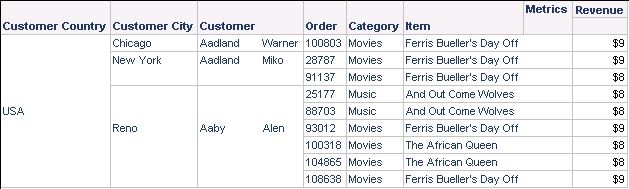
 

  • Create a new report as shown below:
ka02R000000kX5rQAE_0EM440000002CU9.jpeg
  •  
    This report has the following filters:
     
    -Item in List (The African Queen, Ferris Bueller's Day off, And Out Come Wolves)
    -Customer in List(Aaby:Alen, Aadland:Miko,Aadland:Warner)
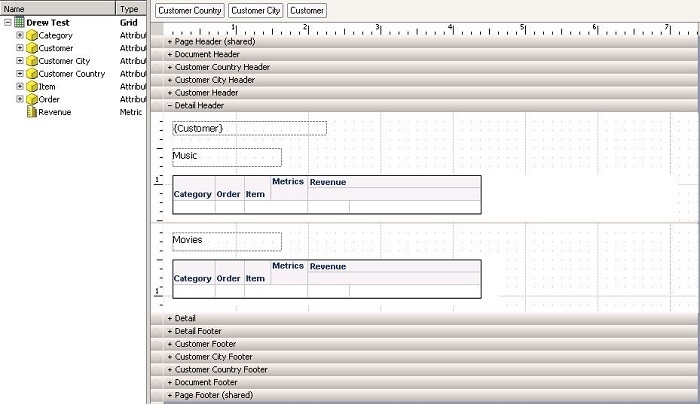
  • Create the following Document using the above report as a dataset.
ka02R000000kX5rQAE_0EM440000002CUF.jpeg
  •  
    -On the first grid create the view filter Catagory in list Music
     
    -On the second grid create the view filter Catagory in list Movies
  • Run the document
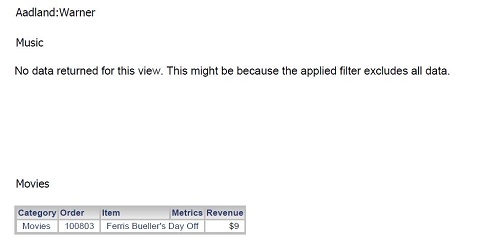
    -The document should display as expected. Customers that order Music and Movies will have both grids populated. If a customer only ordered a Movie item only the second grid will be populated.

    -The following is the page for Aadland:Warner
ka02R000000kX5rQAE_0EM440000002CUB.jpeg
  •  
    In the PDF view of the document select
     
    -Customer Country = USA


    -Customer City = Chicago


    -Customer = Aadland:Warner


    -This is step is important because the next time the document is run 11,000 rows of data will be used, and if the document is displaying “All” in the drop downs the document will take a long time to be generated.


  •  
    Save and close the document


  •  
    Edit the report and delete the "Customer in list" filter
    -The report should now return 11,220 rows
    -Save and close the report


  • Run the document
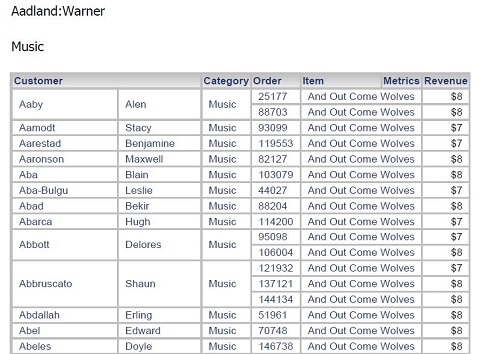
    -Even though Aadland:Warner does not have any orders with Music items, the grid now displays Music order information for all of the customers in the dataset.
    -With Customer added to the grid, is will display as below.
ka02R000000kX5rQAE_0EM440000002CU5.jpeg

 
CAUSE:
 
This is a known issue with Strategy 9.4.1.  Strategy will continue to investigate and post updates as soon as they are available.
 
WORKAROUND:
 
Instead of using a grid use dynamic text boxes with conditional formatting to display the same data.


Comment

0 comments

Details

Knowledge Article

Published:

April 10, 2017

Last Updated:

April 10, 2017