EducationSoftwareStrategy.com
StrategyCommunity

Knowledge Base

Product

Community

Knowledge Base

TopicsBrowse ArticlesDeveloper Zone

Product

Download SoftwareProduct DocumentationSecurity Hub

Education

Tutorial VideosSolution GalleryEducation courses

Community

GuidelinesGrandmastersEvents
x_social-icon_white.svglinkedin_social-icon_white.svg
Strategy logoCommunity

© Strategy Inc. All Rights Reserved.

LegalTerms of UsePrivacy Policy
  1. Home
  2. Topics

KB45957: "[Error: No connection could be made because the target machine actively refused it. Source: Microsoft OLE DB Provider for SQL Server]" error message appears when trying to view elements from SSAS 2012 MDX cube in MicroStrategy Developer.


Stefan Zepeda

Salesforce Solutions Architect • Strategy


This technical note describes an error that occurs when trying to display elements from an MSAS 2012 MDX Cube, in MicroStrategy Developer 9.4.x - 10.x.

SYMPTOM:
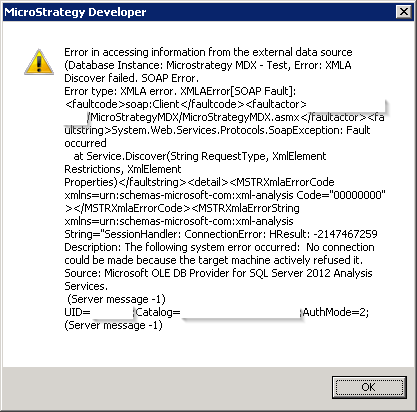
When a user tries to browse through elements in SSAS 2012 MDX cube, they cannot access the elements and encounter a SOAP error that states:
 

ka02R000000kchGQAQ_0EM440000002CUD.png


The following system error occurred: No connection could be made because the target machine actively refused it. Source: Microsoft OLE DB Provider for SQL Server] 

 
CAUSE:
This error message is usually encountered when trying to connect to a service that is inactive on the foreign host, i.e. one with no server application running. The issue could arise when the default Strategy MDX Pool is set to use its own "Identity" on LocalSystem rather than on MDX Application Pool's Identity.
 
ACTION:
Open Internet Information Services (IIS) Manager from Control Panel of the client machine and set StrategyMDXPool Identity from LocalSystem to ApplicationPoolIdentity as shown below in screenshot.

ka02R000000kchGQAQ_0EM440000002CUJ.png

After the change has been made, recreate a database instance that points Strategy to MDX cube data and the user should be able to browse through elements from the SSAS MDX Cube without any error.


Comment

0 comments

Details

Knowledge Article

Published:

April 4, 2017

Last Updated:

April 4, 2017