EducationSoftwareStrategy.com
StrategyCommunity

Knowledge Base

Product

Community

Knowledge Base

TopicsBrowse ArticlesDeveloper Zone

Product

Download SoftwareProduct DocumentationSecurity Hub

Education

Tutorial VideosSolution GalleryEducation courses

Community

GuidelinesGrandmastersEvents
x_social-icon_white.svglinkedin_social-icon_white.svg
Strategy logoCommunity

© Strategy Inc. All Rights Reserved.

LegalTerms of UsePrivacy Policy
  1. Home
  2. Topics

KB45958: Blank error message "()" appears when executing ALTER EMAILSUBSCRIPTION Command Manager script in MicroStrategy 9.3.1


Community Admin

• Strategy


Blank error message "()" appears when executing ALTER EMAILSUBSCRIPTION Command Manager script in MicroStrategy 9.3.1

SYMPTOM:
 
When a user tries to alter a subscription as seen below in Strategy Command Manager 9.3.1,  The following error may occur:


ALTER EMAILSUBSCRIPTION "subscription_name" MANAGE ALL GUID subscription_guid SCHEDULE "schedule_name" IN PROJECT "project_name";


ka04W000000OhoPQAS_0EM440000002CUN.png


()

  
CAUSE:
 
This error can occur when the subscription referenced in the script in an inconsistent state. It is unknown at this time what causes the subscription to get into this state.
 
NOTE:  In this instance, the problematic subscription was not experiencing other issues regarding execution or modification.
 
ACTION:
 
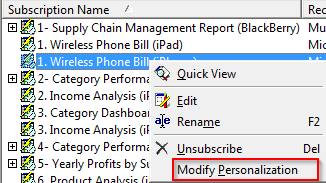
To allow the Command Manager script to be successfully executed browse to the subscription in Administration -> Configuration Managers -> Subscriptions.
 
Right-click on the subscription and modify its Personalization. 

ka04W000000OhoPQAS_0EM440000002CUM.png

 
Resolve the required prompts and then click Finish.  This will put the subscription back in a consistent state and allow it to be modified in Command Manager.
 
If the problem still persists contact Strategy Technical Support.


Comment

0 comments

Details

Knowledge Article

Published:

April 12, 2017

Last Updated:

April 12, 2017