EducationSoftwareStrategy.com
StrategyCommunity

Knowledge Base

Product

Community

Knowledge Base

TopicsBrowse ArticlesDeveloper Zone

Product

Download SoftwareProduct DocumentationSecurity Hub

Education

Tutorial VideosSolution GalleryEducation courses

Community

GuidelinesGrandmastersEvents
x_social-icon_white.svglinkedin_social-icon_white.svg
Strategy logoCommunity

© Strategy Inc. All Rights Reserved.

LegalTerms of UsePrivacy Policy
  1. Home
  2. Topics

KB45984: Unable to use wildcard as comments in Report Pre Statement against Sybase IQ 15.4 in MicroStrategy Developer 9.4


Stefan Zepeda

Salesforce Solutions Architect • Strategy


When attempting to incorporate the use of wildcards as comments in Report Pre Statement in VLDB properties for reports against Sybase IQ 15.4, error message appears.

SYMPTOM:
 
When attempting to incorporate the use of wildcards as comments in Report Pre Statement in VLDB properties for reports against Sybase IQ 15.4, error message appears.
 
If use "!o" to get the report name, the report execution fails due to another error.
 
Error message 1:


Error type: Odbc error. Odbc operation attempted: SQLExecDirect. [42000:-131: on SQLHANDLE] [Sybase][ODBC Driver][Sybase IQ]Syntax error near '(end of line)' on line 1 Connection String: DSN=Sybase;UID=sjiao;. SQL Statement: /*Report Name*/...

 
If use "!p" to get the project name, the report execution fails due to below error.
 
Error message 2:
 

Error type: Odbc error. Odbc operation attempted: SQLExecDirect. Procedure 'Project Name' not found Connection String: DSN=Sybase;UID=sjiao;. SQL Statement: Project Name...
 
 
STEPS TO REPRODUCE:
 
1. Create a report and include any attribute or metric against the Sybase 15.4 warehouse database.
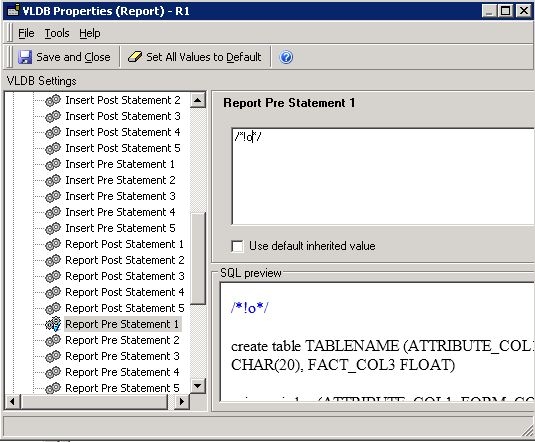
2. In report editor, go to Date -> VLDB Properties -> Pre/Post Statements -> Report Pre Statement. Uncheck User default inherited value and add statement: /*!o*/.
 

ka02R000000kZwsQAE_0EM440000002JCj.jpeg


3. Run report. Error message 1 is thrown out.
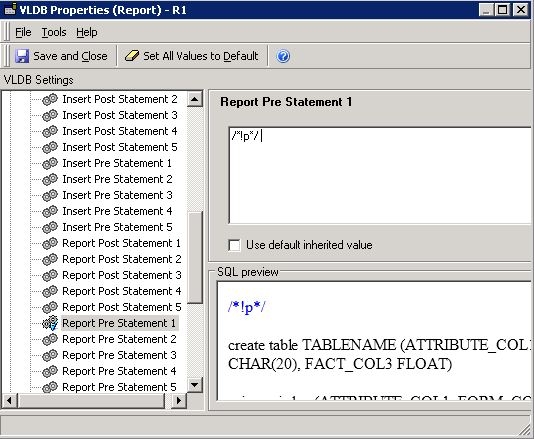
4. Go to Date -> VLDB Properties -> Pre/Post Statements -> Report Pre Statement. Uncheck User default inherited value and add statement: /*!p*/. 
 

ka02R000000kZwsQAE_0EM440000002JCh.jpeg

 
5. Run report. Error message 2 is thrown out.
 
CAUSE:
 
This is a known issue in Strategy 9.4 to handle the comments on Sybase IQ 15.
 
ACTION:
 
Contact Strategy Technical Support for the update of the issue.
 
WORKAROUND:
 
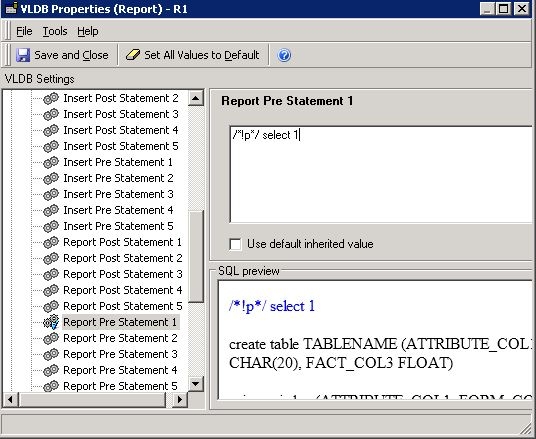
As a workaround, users can add some SQL after the comments like:
/*!o*/ select 1
 

ka02R000000kZwsQAE_0EM440000002JCl.jpeg

 
The additional statement 'select 1' does not affect the report result but it helps to prevent the error message.


Comment

0 comments

Details

Knowledge Article

Published:

June 2, 2017

Last Updated:

June 2, 2017