EducationSoftwareStrategy.com
StrategyCommunity

Knowledge Base

Product

Community

Knowledge Base

TopicsBrowse ArticlesDeveloper Zone

Product

Download SoftwareProduct DocumentationSecurity Hub

Education

Tutorial VideosSolution GalleryEducation courses

Community

GuidelinesGrandmastersEvents
x_social-icon_white.svglinkedin_social-icon_white.svg
Strategy logoCommunity

© Strategy Inc. All Rights Reserved.

LegalTerms of UsePrivacy Policy
  1. Home
  2. Topics

KB45985: In MicroStrategy Developer 9.x, when trying to add parent attributes, the expected parent attribute is not listed in the parent candidates.

Stefan Zepeda

Salesforce Solutions Architect • Strategy


In MicroStrategy Developer 9.x, when trying to add parent attributes, the expected parent attribute is not listed in the parent candidates.

SYMPTOM:
 
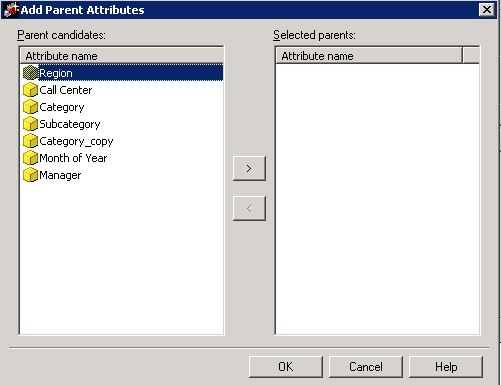
In attribute editor, when trying to add parent attributes, the expected parent attribute is not listed in the parent candidates.

ka02R000000kYE8QAM_0EM440000002CSq.jpeg


CAUSE:
 
The reason why the attribute is not listed as parent candidate is that there is no relationship table found to define the hierarchy structure, which stores the hierarchical relationship between the elements of parent and child attributes.
 
ACTION:
 
Create relationship table to define the hierarchical organization of the two attributes or add a new parent attribute field in the look up table of child attribute.


Comment

0 comments

Details

Knowledge Article

Published:

June 9, 2017

Last Updated:

June 9, 2017