SYMPTOM:
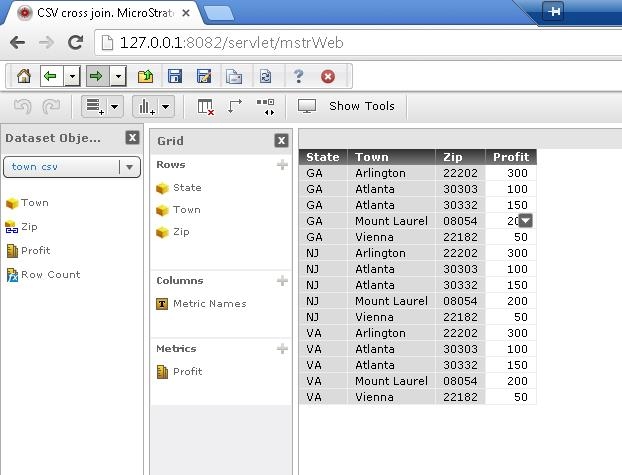
When joining two cubes on an attribute in Strategy Web or Strategy Analytics Desktop, users will sometimes see cross joins between the two cubes instead of the expected inner joins.
STEPS TO REPRODUCE:
The following steps demonstrate how to reproduce this issue in Strategy Analytics Desktop. Follow the steps to reproduce in Strategy Analytics Desktop 9.4.1:
Place attributes on the grid from both datasets.
In the example below, the datasets share the attribute of "zip" but one includes the attribute "state", and the other includes the attribute "town" and the metric "profit".
Users will expect to see the datasets combined with an inner join as displayed below.
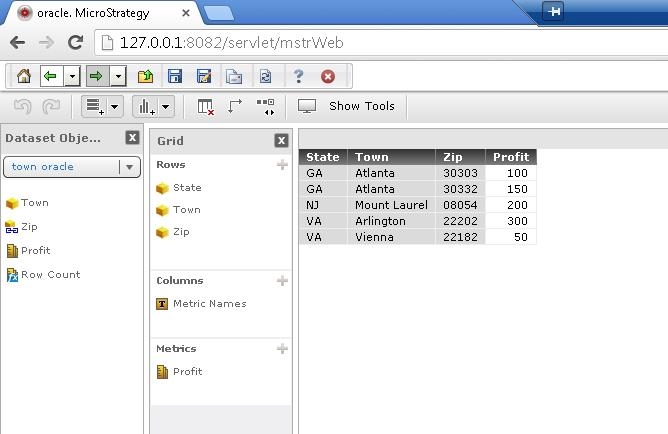
However, sometimes users will see the datasets joined together with a cross join as displayed below.
CAUSE:
This is a known issue in Strategy Web 9.4.1 and Strategy Analytics Desktop 9.4.1
ACTION:
This issue has been addressed in Strategy Web 9.4.1 Hotfix 3 and Strategy Analytics Desktop 9.4.1.5. Upgrade to these versions to take advantage of the fix.
WORKAROUND:
Some users have been able to fix this issue by re-importing the data into Strategy Analytics Desktop and creating new cubes. Users can also use specific SQL in the import data process to create one cube that has the desired data from multiple tables and then create the report.
