EducationSoftwareStrategy.com
StrategyCommunity

Knowledge Base

Product

Community

Knowledge Base

TopicsBrowse ArticlesDeveloper Zone

Product

Download SoftwareProduct DocumentationSecurity Hub

Education

Tutorial VideosSolution GalleryEducation courses

Community

GuidelinesGrandmastersEvents
x_social-icon_white.svglinkedin_social-icon_white.svg
Strategy logoCommunity

© Strategy Inc. All Rights Reserved.

LegalTerms of UsePrivacy Policy
  1. Home
  2. Topics

KB46005: A pull down list selector does not clear the search results after searching once in a transaction services document in MicroStrategy Web 9.x.


Community Admin

• Strategy


A pull down list selector does not clear the search results after searching once in a transaction services document in MicroStrategy Web 9.x.

SYMPTOM:
In a Transaction Services Document, after searching for elements in a pull down list selector and choosing one from the results set, if the users then clears the selector, the selector results will continue to be filtered by the previous input and would not allow the user to change the selection, in Strategy 9.x.
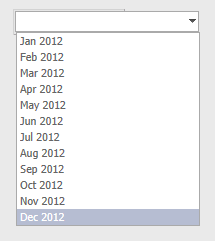
The image below shows the selector returning all attribute elements for the Month attribute:
 

ka04W000000OaaxQAC_0EM4400000026Jl.png


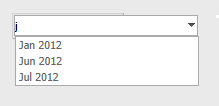
If a user types in the "j" letter to perform a search, the following results appear:
 

ka04W000000OaaxQAC_0EM4400000026K3.png

 
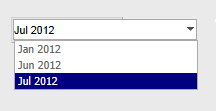
The user then selects one of the options, such as "Jul 2012", as shown below:
 

ka04W000000OaaxQAC_0EM4400000026Ji.png

 
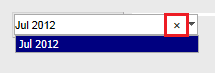
Then the user attempts to clear the current selection to select a different option using the "x" button, like shown below:
 

ka04W000000OaaxQAC_0EM4400000026Jm.png


However, even when the contents of the selector have been cleared, the search results are still filtered by the previous input, like shown below:
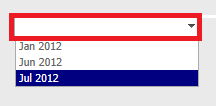
 

ka04W000000OaaxQAC_0EM4400000026Jt.png

 
STEPS TO REPRODUCE:
 
Follow these steps in a Strategy Tutorial Project:

  • Edit the Monthly Regional Sales Targets Planning document, located at:

    
    Shared Report/Strategy Platform Capabilities/Strategy Transaction Services
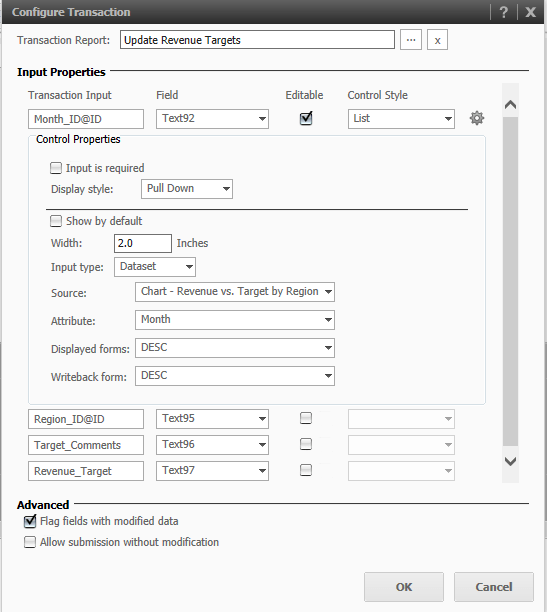

      
  • Create a panel stack and place 4 text boxes.
  • Right click on the text box and select Configure Transaction.
  • Search the transaction report called Update Revenue Targets.
  • Make the following configurations:
     
ka04W000000OaaxQAC_0EM4400000026K4.png
  • Run the document in Express mode, and follow the steps provided in the section above. 

CAUSE:
This is expected behavior and by design in Strategy Web 9.x.
 
 WORKAROUND: 

  • After using the 'x' button to clear the contents of the dropdown, proceed to use the Backspace button from the keyboard as well. This will finally clear the previous search result and allow to search for other content.
ka04W000000OaaxQAC_0EM4400000026K1.png
  • Refresh the Transaction Service document. This will put the document back in it's initial state where the search is clear.
ka04W000000OaaxQAC_0EM4400000026Js.png


KB46005


Comment

0 comments

Details

Knowledge Article

Published:

June 12, 2017

Last Updated:

December 28, 2018