Strategy 9.4.x-10.x allows users to set governing limits on jobs at the Intelligence Server and project levels. This article explains these settings available on the project level. For more information about job governing settings available at the server level, refer to the following Strategy Knowledge Base Technical Note:
KB46009 - What are the general governing parameters for the Intelligence Server in Strategy 9.x?
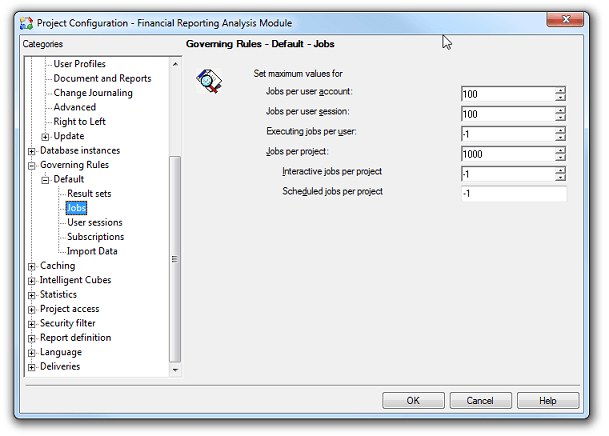
Governing rules set at the project level are overridden by their server-level counterparts. In a clustered system, these settings limit the number of concurrent jobs per project on every node of the cluster. Governing rules for jobs on the project level are found in Strategy Developer under Project Configuration> Governing Rules > Default > Jobs as shown below.
Concurrent jobs include report, element, and autoprompt requests that are executing or waiting to execute, therefore executing one document or report can create multiple jobs. Finished jobs, cached jobs, or jobs that returned errors are not counted by these limits.
For the following numerical governing limits, values of 0 and -1 indicate "no limit".
Jobs per user account: Limits the number of concurrent jobs for a given user account and project. By default, this is set to 100.
Jobs per user session: Limits the number of concurrent jobs a user may have during a given session. By default, this is set to 100.
Executing jobs per user: Limits the number of concurrent jobs a single user may have executing, regardless of the number of sessions the user has opened. Jobs that exceed this limit are placed in a queue. Once the executing jobs are finished the waiting jobs will be executed in the order they were received. By default, this is set to -1. For more information on how this setting works, refer to the following Strategy Knowledge Base Technical
Note:Scheduled jobs per project: Limits the number of concurrent scheduled jobs that may exist on this project. By default, this is set to -1.
Note: Users will not be warned if a change to this project-level rule challenges pre-existing scheduled jobs. Pre-existing jobs that violate this governing rule will generate the following error in the DSSErrors.log.
KB16072 - How does the ’Executing jobs per user’ setting work in Strategy Intelligence Server 9.x?
Jobs per project: Limits the number of concurrent jobs that the project can process at a time. By default, this is set to 1000.
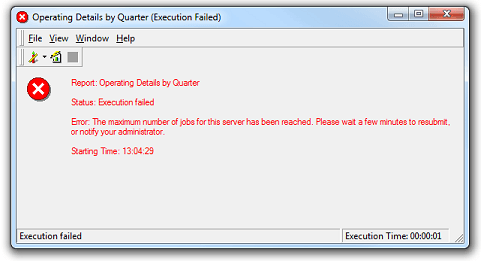
Interactive jobs per project: Limits the number of concurrent non-scheduled jobs that may exist on this project. By default, this is set to -1. An interactive job that violates this governing rule will display the following message:
An interactive job that violates this governing rule in Strategy Web will display the following message:
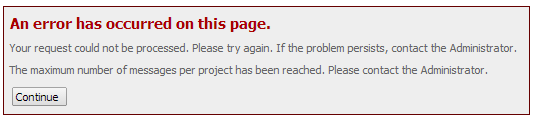
The maximum number of messages per project has been reached. Please contact the Administrator.
