MSTRLogs are log files generated by Strategy Web's diagnostics, where errors, warnings and/or messages are recorded for use in troubleshooting unexpected behavior in your environment.
To define the level of the recordings (OFF, Errors, Warnings or Messages) or the location where the log files will be written to, access the Strategy Web Administrator page. From the left navigation menu, select the Configuration option under the Diagnostics subsection, as shown in the image below:
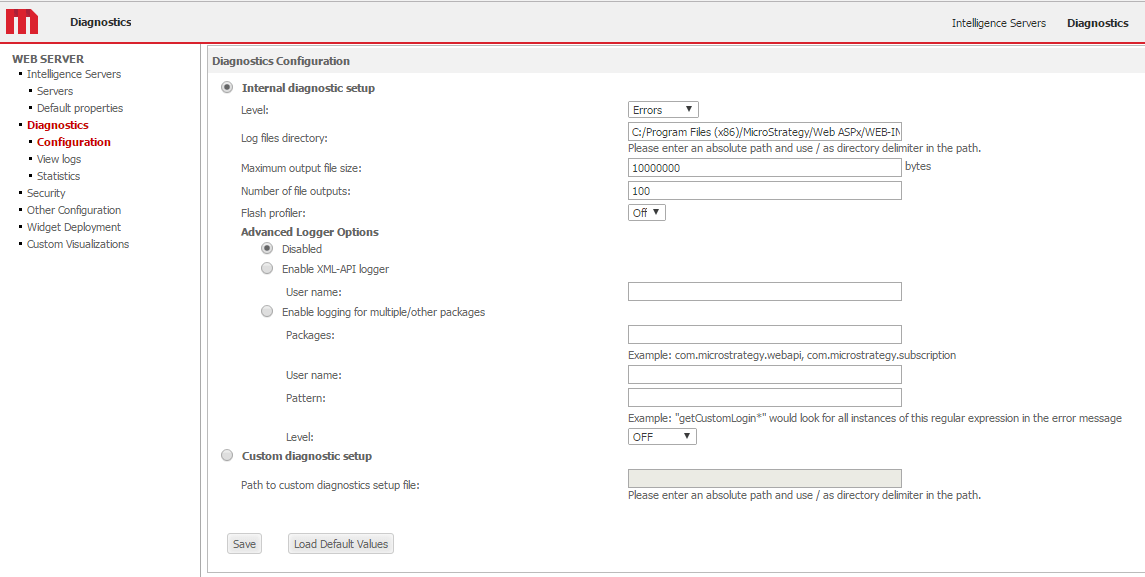
In the section titled Internal diagnostic setup, the following levels can be defined:
o OFF: Nothing is written in the log file.
o Errors: This is the default option. Errors generated by Strategy Web are included in the log file.
o Warnings: Errors and warnings generated by Strategy Web are included in the log file.
o Messages: Errors, warnings, and messages generated by Strategy Web are included in the log file.
The log file will be generated in the path specified under 'Log files directory' with a name of the format MSTRmmddyyyy.log_num.
KB9836: How is the Web XML API log enabled in MicroStrategy Web?
