EducationSoftwareStrategy.com
StrategyCommunity

Knowledge Base

Product

Community

Knowledge Base

TopicsBrowse ArticlesDeveloper Zone

Product

Download SoftwareProduct DocumentationSecurity Hub

Education

Tutorial VideosSolution GalleryEducation courses

Community

GuidelinesGrandmastersEvents
x_social-icon_white.svglinkedin_social-icon_white.svg
Strategy logoCommunity

© Strategy Inc. All Rights Reserved.

LegalTerms of UsePrivacy Policy
  1. Home
  2. Topics

KB46022: Using URL API to pass multiple selector elements to a prompted report or document does not answer the prompts when executed from Flash mode in MicroStrategy Web 9.4.1


Community Admin

• Strategy


SYMPTOM:
 
Starting Strategy Web 9.2.1 Hotfix 9, users have the ability to pass multiple selections from a selector to a prompted report or document using the &CurrentSelectionElementID parameter, as per tech note KB40099. However, in Strategy Web 9.4.1 when using this parameter from Flash mode, the selector’s values are not passed, thus the prompts in the target are not answered, as shown below:
 

ka04W000000ObupQAC_0EM4400000026K7.jpeg

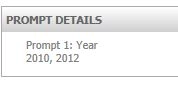
The prompt properties show as "not answered".  When trying the same from Interactive mode, the values are passed properly as shown below:
ka04W000000ObupQAC_0EM4400000026KD.jpeg

 
STEPS TO REPRODUCE: 
 
Follow these steps to reproduce the issue in a Strategy Tutorial Project:

  • Create a report with the Year attribute (report A).
  • Create an attribute element list prompt for the Year attribute.
  • Create another report with the Year attribute and the prompt in step 2 (report B).
  • Create a document from report A.
  • In the document, create a panel stack.
  • Add a text box to that panel stack.
  • Create a selector for the Year attribute and make it target the panel stack, like shown below.
ka04W000000ObupQAC_0EM4400000026KH.jpeg
  • Configure the text inside the panel stack to be a hyperlink that points to report B and  uses the &CurrentSelectionElementID parameter, following the instructions in tech note KB40099, as shown below:
ka04W000000ObupQAC_0EM4400000026KF.jpeg
  • Run the document in Flash mode.
  • Select Year 2010 and 2012, like shown below.
ka04W000000ObupQAC_0EM4400000026KJ.jpeg
  • Click on the link and observe the prompt in report B is not answered as shown above.
  • Repeat step 9-11 but by running the document in Interactive mode.
  • Observe the prompt in report B is answered as shown above.

CAUSE:
 
This is a known issue in Strategy Web 9.4.1 that did not occur in Strategy Web 9.3.1.
 
ACTION:
 
This issue has been addressed in Strategy Web 9.4.1 Hot Fix 3. Upgrade to this version to take advantage of the fix.
  
WORKAROUND:
 
Consider using other view modes than Flash mode to take advantage of this feature.
KB46022


Comment

0 comments

Details

Knowledge Article

Published:

May 26, 2017

Last Updated:

April 18, 2018