EducationSoftwareStrategy.com
StrategyCommunity

Knowledge Base

Product

Community

Knowledge Base

TopicsBrowse ArticlesDeveloper Zone

Product

Download SoftwareProduct DocumentationSecurity Hub

Education

Tutorial VideosSolution GalleryEducation courses

Community

GuidelinesGrandmastersEvents
x_social-icon_white.svglinkedin_social-icon_white.svg
Strategy logoCommunity

© Strategy Inc. All Rights Reserved.

LegalTerms of UsePrivacy Policy
  1. Home
  2. Topics

KB46044: When the "Region and Language" settings for English (South Africa) in Microsoft Windows do not match the Intelligence Server default settings, Microsoft Office may display an incorrect character format in MicroStrategy Office 9.x.


Community Admin

• Strategy


When the "Region and Language" settings for English (South Africa) in Microsoft Windows do not match the Intelligence Server default settings, Microsoft Office may display an incorrect character format in MicroStrategy Office 9.x.

SYMPTOM:
 
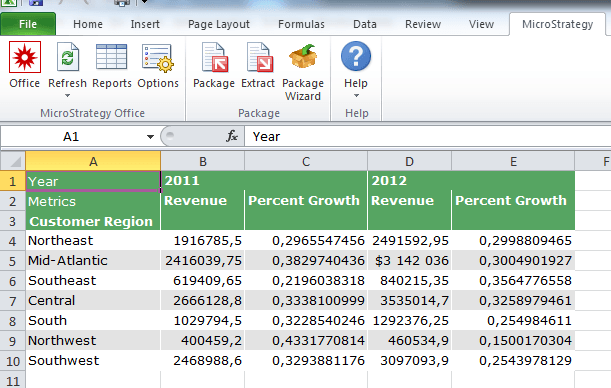
In Strategy 9.x, if the Microsoft Windows "Region and Language" setting is set to "English (South Africa)", running a grid report in Microsoft Office does not display the decimal values and percentage characters correctly. The user will see a comma "," instead of a period "." in the decimal value, and the percentage character is not diplayed for percentage values.
 
STEPS TO REPRODUCE:
 
Follow the steps below to reproduce the issue in Strategy Tutorial project:

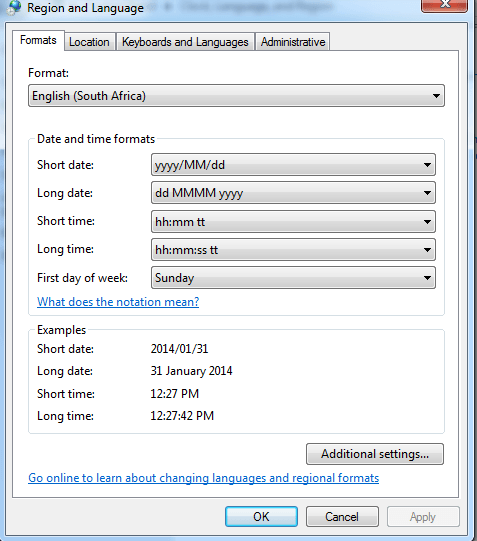
  • In Windows, go to Control panel > Clock, Language and Region > Region and Language > "Formats" tab > choose "English(South Africa)". In the 'Location' tab > Choose "South Africa".
     
ka04W000000OhaaQAC_0EM4400000026KQ.png
  • In the "Region and Language" window, click "Additional Settings..." at the bottom of the window. Note that in the "Numbers" tab, the "Decimal Symbol" is set to period (.) by default.
     
ka04W000000OhaaQAC_0EM4400000026KR.png
ka04W000000OhaaQAC_0EM4400000026KU.png
  • From Microsoft Office, run a grid report that has decimal values. Notice that the decimal symbol for the decimal value is comma (,) instead of period. Also, the percentage character does not appear for percentage values.
     
ka04W000000OhaaQAC_0EM4400000026KV.png
  • If, in step 2, the decimal symbol is changed to asterisk (*), then the output in the quick grid will show commas.  

CAUSE:
 
This is a known issue in Strategy 9.x.
 
ACTION:
 
Update to 9.4.1 Hotfix 1 to take advantage of the fix.


Comment

0 comments

Details

Knowledge Article

Published:

May 12, 2017

Last Updated:

May 12, 2017