EducationSoftwareStrategy.com
StrategyCommunity

Knowledge Base

Product

Community

Knowledge Base

TopicsBrowse ArticlesDeveloper Zone

Product

Download SoftwareProduct DocumentationSecurity Hub

Education

Tutorial VideosSolution GalleryEducation courses

Community

GuidelinesGrandmastersEvents
x_social-icon_white.svglinkedin_social-icon_white.svg
Strategy logoCommunity

© Strategy Inc. All Rights Reserved.

LegalTerms of UsePrivacy Policy
  1. Home
  2. Topics

KB46053: "Error saving and publishing the Cube" error message appears when attempting to link an imported Excel attribute to a project attribute in Data Import in MicroStrategy Web


Community Admin

• Strategy


SYMPTOM:
 
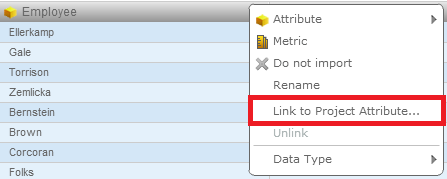
In Strategy Web 9.4.1, a user can use Data Import to import an Excel file and link its attributes to project attributes by using the "Link to Project Attribute" feature, as shown below.
 

ka04W00000148cYQAQ_0EM4400000026Jo.png

Note: For more information on this feature, refer to tech note KB000039514.
 
However, after the user selects a project attribute to link to and clicks "OK", they receive the following error message:


Error saving and publishing the Cube:com.Strategy.webapi.MSTRWebAPIException: (Item 'ABRV DESC' cannot be found.)"

 
The user is thus prevented from successfully linking Excel attributes to project attributes.
 
CAUSE:
 
This is a known issue in Strategy Web 9.4.1.
 
ACTION:
 
This issue has been addressed with Strategy 10. Upgrade to take advantage of the fix.
 
WORKAROUND:

  • In Strategy Developer 9.4.1, connect to the project facing the issue, then navigate to Schema > Form Categories, as shown below.
     
ka04W00000148cYQAQ_0EM4400000026Jw.jpeg
  • Choose "ID" and click the "Set as ID" button, as shown below.
ka04W00000148cYQAQ_0EM4400000026Jy.jpeg
  • Click OK, then restart the Intelligence Server for the settings to take effect.

Comment

0 comments

Details

Knowledge Article

Published:

June 8, 2017

Last Updated:

January 22, 2018