EducationSoftwareStrategy.com
StrategyCommunity

Knowledge Base

Product

Community

Knowledge Base

TopicsBrowse ArticlesDeveloper Zone

Product

Download SoftwareProduct DocumentationSecurity Hub

Education

Tutorial VideosSolution GalleryEducation courses

Community

GuidelinesGrandmastersEvents
x_social-icon_white.svglinkedin_social-icon_white.svg
Strategy logoCommunity

© Strategy Inc. All Rights Reserved.

LegalTerms of UsePrivacy Policy
  1. Home
  2. Topics

KB46066: "Error: TypeError: Cannot read property 'parentNode' of null" error is encountered when interacting with a panel that belongs to a Panel Stack that has been hidden from the current Managed View in MicroStrategy Web 9.x.


Community Admin

• Strategy


"Error: TypeError: Cannot read property 'parentNode' of null" error is encountered when interacting with a panel that belongs to a Panel Stack that has been hidden from the current Managed View in MicroStrategy Web 9.x.

SYMPTOM: 
In Strategy Web 9.x, there is a feature called "Manage Views" which allows users to specify how to display documents on mobile devices, by giving display options based on user device rotation and device resolution. For more information on this feature, also see KB47490: Manage Mobile Views in MicroStrategy Mobile 9.4.x and 10.x
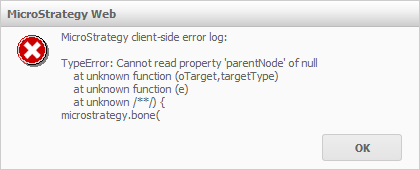
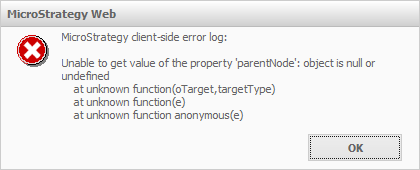
One of the features of Manage Views is the ability to delete an object from a single view, which is done by deleting the object in Design Mode, either in the Document Structure tab or in the template itself.  It is also possible to hide objects in a view by unchecking the "Visible" check box in the objects "Properties and Formatting" window.  The object will then be hidden in that view, and by default in the template of that view as well.  However, all objects will still be displayed in the Document Structure tab in all views, regardless of whether they have been deleted.  This means that after having deleted a Panel Stack from a view,  a user can still interact with all the panels it contains in the Document Structure tab.  When a user clicks on a panel inside of a removed Panel Stack, a JavaScript error will appear as shown below:
In Google Chrome:
ka04W000000OhG2QAK_0EM4400000026J5.png


TypeError: Cannot read property 'parentNode' of null at unknown function (oTarget,targetType) at unknown function (e) at unknown /**/ { Strategy.bone( 
In Internet Explorer:

ka04W000000OhG2QAK_0EM4400000026Is.png


Strategy client-side error log: Unable to get value of the property 'parentNode': object is null or undefined at unknown function(oTarget,targetType) at unknown function(e) at unknown function anonymous(e)
 
STEPS TO REPRODUCE:

  •  Create a blank dashboard.
  •  Add a Panel Stack to the document.
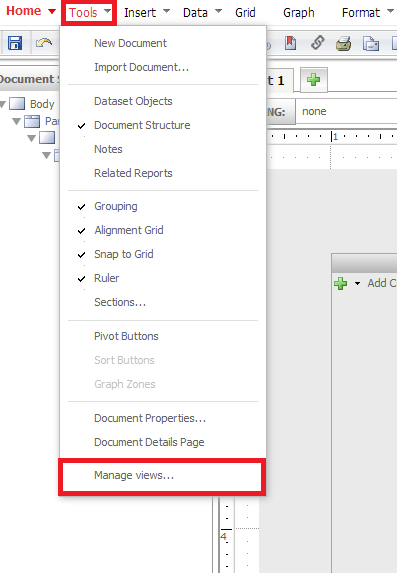
  • Open the Manage Views menu through Tools > Manage Views, like shown below.
ka04W000000OhG2QAK_0EM4400000026In.png
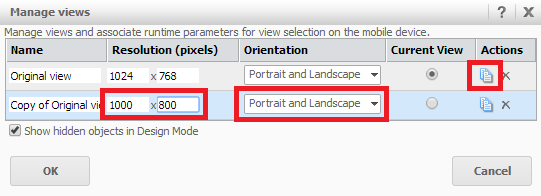
  • Create a new view by clicking the blue "Duplicate" button next to the existing view, like shown below.
ka04W000000OhG2QAK_0EM4400000026Iq.png
  • Change the resolution or orientation of the second view, as it will not allow two views with the same resolution and orientation to exist.
     
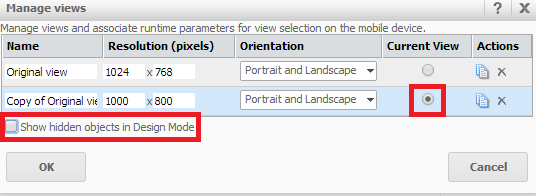
  • Make the second view the "Current view" and uncheck the check box "Show hidden objects in Design Mode", like shown below.
ka04W000000OhG2QAK_0EM4400000026J1.png
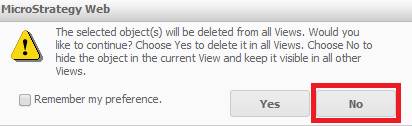
  • While in the second view, delete the panel stack that was created previously. The following warning appears:
ka04W000000OhG2QAK_0EM4400000026J4.png
  • 
    The selected object(s) will be deleted from all Views. Would you like to Continue? Choose Yes to delete it in all Views. Choose No to hide the object in the current View and keep it visible in all other views.


  • Select the "No" option in the popup menu to only hide the object from the current view.
     
  • Navigate to the Manage Views menu again; this refreshes the view. 
  • When the Panel Stack disappears, click OK without making any changes in the Manage Views menu.
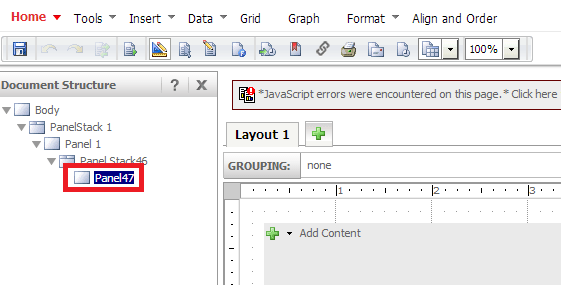
  • Navigate to the Document Structure tab and click on the panel contained in the deleted panel stack to get the error, like shown below.
ka04W000000OhG2QAK_0EM4400000026Iw.png

CAUSE:
This is a known issue in Strategy Web 9.x. The error appears due to the way panels find their parent object.  Normally, a panel would look above itself in the document structure and identify its parent node.  However, since the Panel Stack has been deleted in the current view, the panel cannot find the parent Panel Stack, and serves this error to the user in the form of a JavaScript error notification.
 
ACTION:
Strategy will continue to investigate and post updates as soon as they are available.


Comment

0 comments

Details

Knowledge Article

Published:

May 27, 2017

Last Updated:

May 27, 2017