EducationSoftwareStrategy.com
StrategyCommunity

Knowledge Base

Product

Community

Knowledge Base

TopicsBrowse ArticlesDeveloper Zone

Product

Download SoftwareProduct DocumentationSecurity Hub

Education

Tutorial VideosSolution GalleryEducation courses

Community

GuidelinesGrandmastersEvents
x_social-icon_white.svglinkedin_social-icon_white.svg
Strategy logoCommunity

© Strategy Inc. All Rights Reserved.

LegalTerms of UsePrivacy Policy
  1. Home
  2. Topics

KB46075: "Use Live Excel Charts" export option will omit the last attribute element in the axis label if there is only one row of data returned in MicroStrategy Web 9.4.1.


Community Admin

• Strategy


"Use Live Excel Charts" export option will omit the last attribute element in the axis label if there is only one row of data returned in MicroStrategy Web.

SYMPTOM:
 
In Strategy Web, a user can choose to export all graphs to Excel as either Live Charts or Images. For more information on these preferences refer to tech note KB30217: Export options in MicroStrategy: Embed images, Use live Excel charts, Use embedded bitmaps
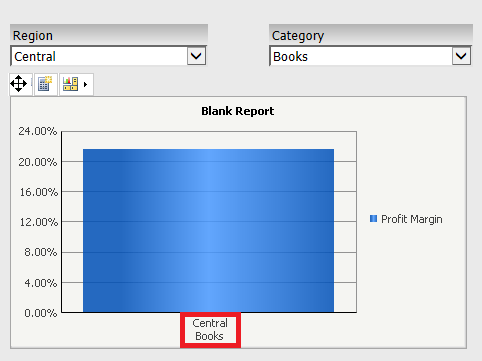
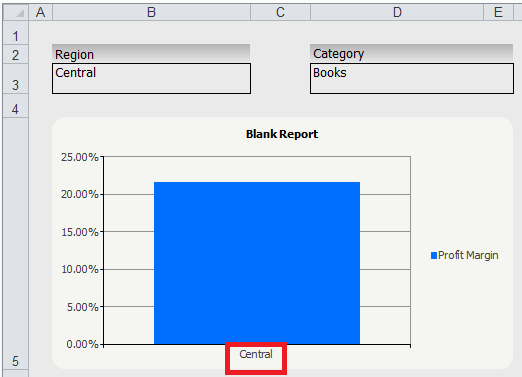
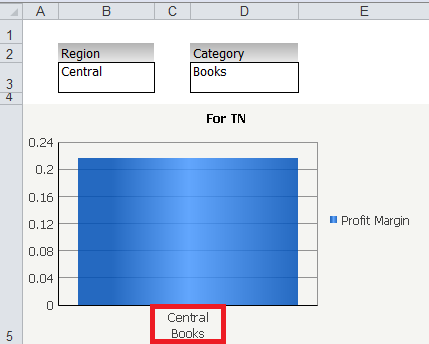
However, users notice that when exporting graphs as a live charts, if there is only one row of data in the grid, the last attribute element in the axis label will not be displayed after exporting to Excel, like shown below:
 
In Strategy Web:
 

ka04W00000148rJQAQ_0EM4400000026Jr.png

 Notice how the selectors filter the graph to return only one row of data
 
In Microsoft Excel: 
ka04W00000148rJQAQ_0EM4400000026Jb.png

 Notice how Books is missing from the axis label.
 
STEPS TO REPRODUCE:
 
Follow these steps in a Strategy Tutorial project
  • Create a report with the Region and Category attributes and the Profit Margin metric.
  • Create a document using this report as a dataset.
  • Display the report as a vertical bar graph.
  • In order to get one row of data, create a selector for each attribute (or use a filter).
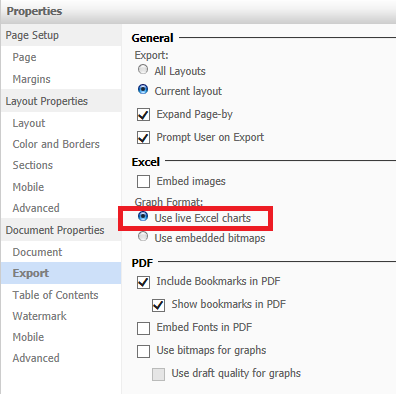
  • In the Document properties > Export, select "Use live Excel charts" as shown below.
ka04W00000148rJQAQ_0EM4400000026Jn.png
  • Export to Excel to reproduce the issue.

CAUSE:
This is a known issue in Strategy Web  9.4.1 and above.
 
ACTION:
Strategy will continue to investigate and post updates as soon as they are available.
  
WORKAROUND:
 

  • Export to Excel using embedded bitmaps. This will result in the following:
ka04W00000148rJQAQ_0EM4400000026JZ.png
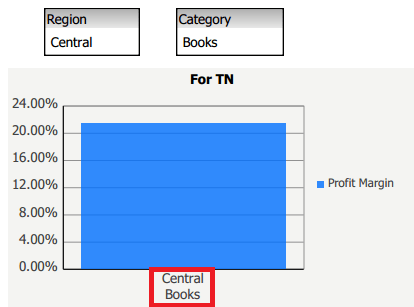
  • Or export to PDF instead.
ka04W00000148rJQAQ_0EM4400000026Jp.png


Comment

0 comments

Details

Knowledge Article

Published:

June 14, 2017

Last Updated:

November 21, 2019