EducationSoftwareStrategy.com
StrategyCommunity

Knowledge Base

Product

Community

Knowledge Base

TopicsBrowse ArticlesDeveloper Zone

Product

Download SoftwareProduct DocumentationSecurity Hub

Education

Tutorial VideosSolution GalleryEducation courses

Community

GuidelinesGrandmastersEvents
x_social-icon_white.svglinkedin_social-icon_white.svg
Strategy logoCommunity

© Strategy Inc. All Rights Reserved.

LegalTerms of UsePrivacy Policy
  1. Home
  2. Topics

KB46078: Attribute form data type in a freeform SQL report does not get automatically updated after changing its type through the attribute editor, in MicroStrategy Desktop 9.3.1 onwards.


Stefan Zepeda

Salesforce Solutions Architect • Strategy


This technical note documents a behavior observed when trying to change an attribute form data type in a Freeform SQL report.

SYMPTOM:
Attribute form data type in a freeform SQL report is not automatically updated after changing its type through the attribute editor, in Strategy Desktop 9.3.1 onwards.
 
STEPS TO REPRODUCE:
These are the steps to reproduce the issue in Strategy Tutorial:
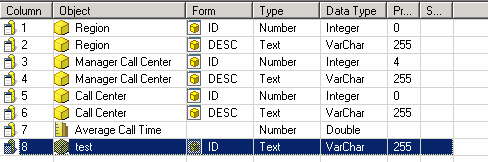
 

  • Edit any freeform SQL report, and add a new attribute form called test, whose type is Text and data type Varchar.
     
ka02R000000kbuWQAQ_0EM440000002CTK.png
  • Press OK; the report editor will appear. The new managed object displays in the Report Objects window.
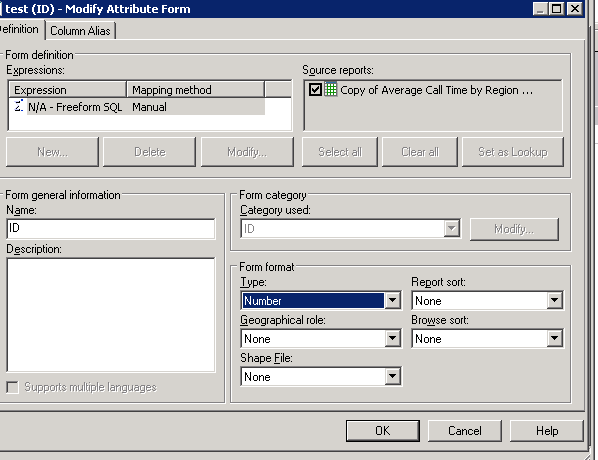
  • Edit attribute test. Modify the ID form and change its type from Text to Number. Save and close and upate schema.
     
ka02R000000kbuWQAQ_0EM440000002CTI.png
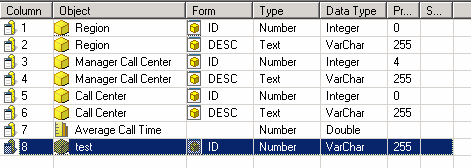
  • Open the freeform SQL report again and check its definition: the type has been correctly updated but not the data type.
     
     
ka02R000000kbuWQAQ_0EM440000002CTH.png

 The same behaviour is observed with standard project attributes.
 
 
CAUSE:
This is working by design.
 
WORKAROUND:
The attribute form data type can be modified manually through the freeform SQL report editor.


Comment

0 comments

Details

Knowledge Article

Published:

June 6, 2017

Last Updated:

June 6, 2017