EducationSoftwareStrategy.com
StrategyCommunity

Knowledge Base

Product

Community

Knowledge Base

TopicsBrowse ArticlesDeveloper Zone

Product

Download SoftwareProduct DocumentationSecurity Hub

Education

Tutorial VideosSolution GalleryEducation courses

Community

GuidelinesGrandmastersEvents
x_social-icon_white.svglinkedin_social-icon_white.svg
Strategy logoCommunity

© Strategy Inc. All Rights Reserved.

LegalTerms of UsePrivacy Policy
  1. Home
  2. Topics

KB46081: MicroStrategy Web 9.4.1 Metric Editor becomes unresponsive when switching to the function editor after clearing the function contents


Community Admin

• Strategy


MicroStrategy Web 9.4.1 Metric Editor becomes unresponsive when switching to the function editor after clearing the function contents

SYMPTOM:
 
The Strategy Web 9.4.1 Metric Editor becomes unresponsive when switching to the function editor after clearing the function contents when using the Sum, First and other functions that use the same Function Editor will cause the function chooser to become unresponsive as shown below:
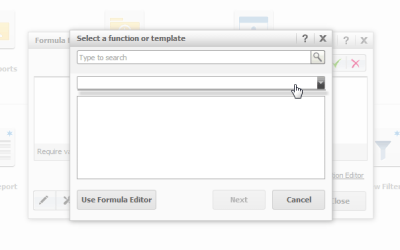
ka04W000000OdwAQAS_0EM4400000026JL.png

In the image above Strategy users are unable to search, choose or cancel out of the metric editor window.
 
STEPS  TO REPRODUCE:
  • Open Strategy Web 9.4.1 and select the "New Metric" icon in the default homepage.
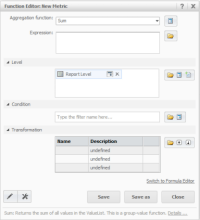
  • Search for Sum, First or any other function that uses the same function editor page shown in the next step.
  • Select the function and click next, this issue is reproducible with any function that uses the following function editor page:
     
     
ka04W000000OdwAQAS_0EM4400000026JO.png
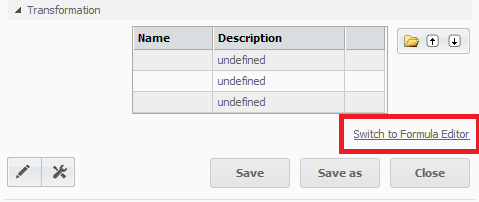
  • In the function editor, click on "Switch to Formula Editor"  without making changes as shown below:

ka04W000000OdwAQAS_0EM4400000026JF.png
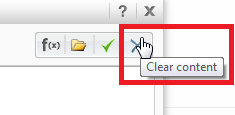
  • In the formula editor click on "Clear Content" as shown below:

ka04W000000OdwAQAS_0EM4400000026JH.png
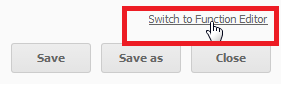
  • Now click on "Switch to function editor" as shown below:

ka04W000000OdwAQAS_0EM4400000026JJ.png
  • Notice that the window is now unresponsive as described in the symptom.

CAUSE:
 
This is a known issue with the metric editor in Strategy Web 9.4.1.
 
ACTION:
 
Contact Strategy Technical Support for an update on this issue.
 
WORKAROUND:
 
Reloading the Strategy Home page to exit the metric editor. Note: All changes will be lost and the user will have to start over.


Comment

0 comments

Details

Knowledge Article

Published:

June 15, 2017

Last Updated:

June 15, 2017