EducationSoftwareStrategy.com
StrategyCommunity

Knowledge Base

Product

Community

Knowledge Base

TopicsBrowse ArticlesDeveloper Zone

Product

Download SoftwareProduct DocumentationSecurity Hub

Education

Tutorial VideosSolution GalleryEducation courses

Community

GuidelinesGrandmastersEvents
x_social-icon_white.svglinkedin_social-icon_white.svg
Strategy logoCommunity

© Strategy Inc. All Rights Reserved.

LegalTerms of UsePrivacy Policy
  1. Home
  2. Topics

KB46083: Users are unable to filter the elements on a attribute element list prompt when using SAP BW as the datasource in MicroStrategy 9.3.x - 10.x


Stefan Zepeda

Salesforce Solutions Architect • Strategy


This technical note describes a behaviour observed when trying to filter the elements on a attribute element list prompt when using SAP BW as the datasource in MicroStrategy 9.3.x - 10.x

SYMPTOM:
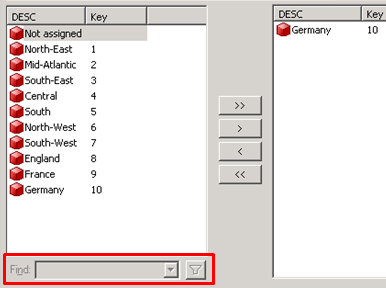
When running a prompted report against SAP users notice that the "find" box to filter/search for elements is grayed out.
 

ka02R000000kbjCQAQ_0EM440000002CTC.png

 
CAUSE:
 
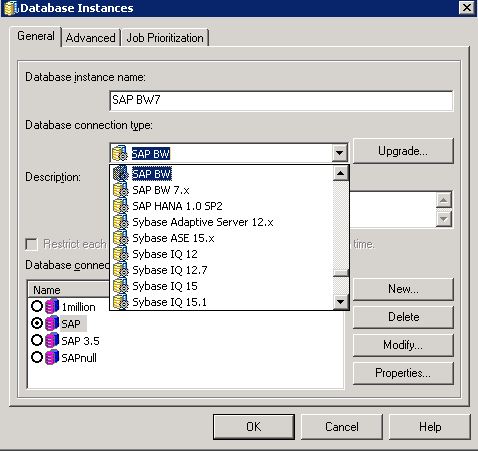
One potential cause of this is connection type of the database instance being used.  For SAP BW datasources, there are different connection types such as SAP BW and SAP BW 7.x.  The "Find" functionality within a prompt page is only available when using the SAP BW 7.x connection type.
 

ka02R000000kbjCQAQ_0EM440000002CTL.png

 
ACTION:
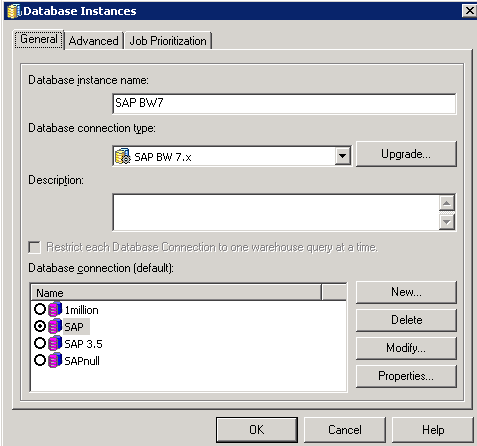
Modify the database instance to use the "SAP BW 7.x" connection type.  With this connection type being used the find functionality should work properly.
 

ka02R000000kbjCQAQ_0EM440000002CTJ.png

 
NOTE:  An additional requirement for this feature can be found in KB45994: Introduction of the ability to search on an element prompt based off a MDX variable from SAP BW query cubes where the variable is optional.


Comment

0 comments

Details

Knowledge Article

Published:

June 9, 2017

Last Updated:

June 9, 2017