EducationSoftwareStrategy.com
StrategyCommunity

Knowledge Base

Product

Community

Knowledge Base

TopicsBrowse ArticlesDeveloper Zone

Product

Download SoftwareProduct DocumentationSecurity Hub

Education

Tutorial VideosSolution GalleryEducation courses

Community

GuidelinesGrandmastersEvents
x_social-icon_white.svglinkedin_social-icon_white.svg
Strategy logoCommunity

© Strategy Inc. All Rights Reserved.

LegalTerms of UsePrivacy Policy
  1. Home
  2. Topics

KB46088: "Incorrect edit mode:1" or “Metric Qualification operator node has no children.” error is seen when editing a report filter in MicroStrategy Web


Community Admin

• Strategy


In MicroStrategy Web , an "Incorrect edit mode:1" or “Metric Qualification operator node has no children” error  is seen when editing a report filter.

SYMPTOM:
 
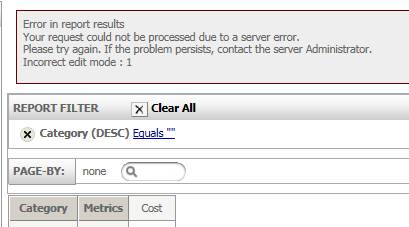
In Strategy Web , an "Incorrect edit mode:1" or “Metric Qualification operator node has no children.” error  is seen when editing a report filter, as shown in the images below.
 
The error message when editing the report filter on the attribute: 
ka04W000000OgKHQA0_0EM4400000026Kt.png


Error in report results
Your request could not be processed due to a server error.
Please try again. If the problem persists, contact the server Administrator.
Incorrect edit mode : 1

 
The error message when editing the report filter on the metric:

ka04W000000OgKHQA0_0EM4400000026Ks.png


Error in report results
Your request could not be processed due to a server error.
Please try again. If the problem persists, contact the server Administrator.
Metric Qualification operator node has no children.

 
STEPS TO REPRODUCE:
Follow the steps below to reproduce the issue with the Strategy Tutorial project:

  • Create a report and add Category attribute, Cost metric.
  • Add Category to REPORT FILTER field.
  • Click 'Apply' as it stands.
  • Press the or key button few times while a small wait page is displayed.
ka04W000000OgKHQA0_0EM4400000026Ku.png

 
CAUSE:
 
This is a known issue with Strategy Web 9.x.
 
ACTION:
 
This issue has been fixed in Strategy Web 10. Take advantage of upgrading for a fix. 


Comment

0 comments

Details

Knowledge Article

Published:

June 15, 2017

Last Updated:

June 15, 2017