What functionality is contained in Strategy Administrator - Object Manager 9.4.x-10.x?
Strategy Administrator - Object Manager allows users to perform the following actions:
Are there any special requirements needed to move objects across projects?
Yes. In order to perform cross-project operations, the projects involved must originate from the same source project. In other words, the projects can only be related by the duplication of a single project. This ensures that the projects have a similar set of schema and application objects, and that the object ID's in the two projects are the same. Strategy Object Manager uses the object and version ID's across the projects to perform comparisons. Strategy Object Manager prevents the user from attempting operations across unrelated projects.
How does Strategy Object Manager determine if two projects are related?
Strategy Object Manager compares the Schema ID's of the two projects. Duplicated projects have different Project ID's, but their Schema ID's are the same.
What happens if a user tries to move objects between two unrelated projects?
If a user tries to perform cross-project operations between two unrelated projects, Strategy Object Manager will not permit the operation and will display the following error:
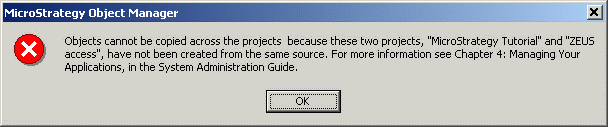
Objects cannot be copied across the projects because these two projects, "Project name of the source" and "Project name of the destination", have not been created from the same source. For more information refer to the System Administration Guide.
What is the Conflict Resolution Window?
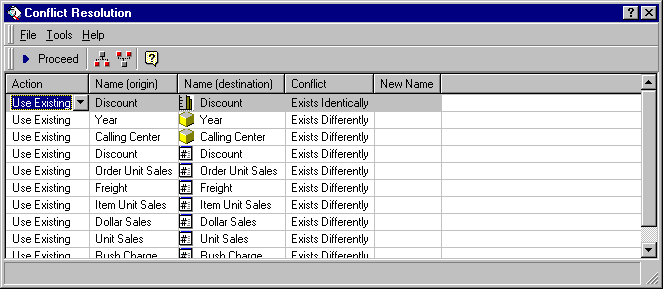
The Conflict Resolution window provides the user with a means to decide how to handle object conflicts between the source project and the destination project. In addition, the Conflict Resolution window displays the object name in the original project, the object name in the destination project and the type of conflict. Users may also specify a new name for the object depending on the action chosen. A sample of the Conflict Resolution grid is shown below:
How does Strategy Object Manager determine if two objects in different projects are the same?
To determine if two objects are the same, Strategy Object Manager compares their Object ID's. If these ID's are the same, Strategy Object Manager then compares the Version ID's. If the Version ID's are the same, the Conflict Resolution grid lists the conflict as 'Exists Identically.' If the Version ID's are different, the Conflict Resolution grid lists the conflict as 'Exists Differently.'
How can the user determine the Object ID of an object?
To view the Object ID of an object, right-mouse click on the object and select 'Properties.' The Object ID and Version ID are listed on the 'General' tab.
Why does Strategy Object Manager search for object dependencies?
Strategy Object Manager makes a list of all object dependencies before copying an object to prevent metadata inconsistency. The time required for dependency checking varies based on a customer's metadata size and schema complexity. For large metadata and complex schemas, gathering all the dependencies may take a long time.
Can schema objects be copied across projects with Strategy Object Manager?
Yes, schema objects can be copied across projects using Strategy Object Manager. Strategy Object Manager moves objects seamlessly between similar projects such as from a development project version to a production project version where the warehouses are the same in terms of views, prefixes, and warehouse structure. However, subtle changes in the warehouse that relate to prefixes, views, or table structure cannot be tracked by Strategy Object Manager. For situations where the projects' warehouse structures or setups are dissimilar, users may be required to make further edits of the objects to ensure full integration into the destination project. These edits may include hierarchical relationship changes or modifications to the prefixes.
How does Strategy Object Manager integrate with the Strategy Product Suite security model?
Security in Strategy Object Manager is based on the Strategy 8.x Product Suite security model. All activities that can be performed in Strategy Object Manager are governed by privileges and access control lists. For example, if a user is not allowed to access a certain folder in Strategy Desktop, they will not be able to access the folder in Strategy Object Manager.
Is it possible to use Strategy Object Manager while other users are making changes in Strategy Desktop?
Using Strategy Object Manager to copy/move objects around is not recommended while other user sessions are making changes using Strategy Desktop, as it could lead to metadata inconsistency. Project and schema locking prevent multiple users sessions from manipulating the schema at the same time. This prevents metadata inconsistency from occurring.
What are the tracing options available in Strategy Object Manager?
Tracing is available under the Tools/Diagnostics menu. These tracing options apply to every Strategy product installed on the machine.
To see the SQL that has been executed against the metadata, go to the Advanced tab and turn on 'SQL Tracing' under the DSS MDServer key.
Function level tracing can be accomplished by going to the Advanced tab and turning on 'Function Level Tracing' under the DSS ObjectManager key.
Where are dependent objects copied if they do not already exist in the destination project?
If the location exists in the destination project, the dependent object is copied to that location. If the location does not exist in the destination project, a new folder entitled 'Dependencies' is created and the object is copied to that folder.
What happens if the owner of an object does not exist in the destination project?
If the owner of the source object does not exist in the destination project, the user login for the destination project takes ownership of the object when it is copied or replaced.
Where can users find more information on Strategy Object Manager?
Further information can be found in the release notes, as well as in Strategy Object Manager's online help.
