EducationSoftwareStrategy.com
StrategyCommunity

Knowledge Base

Product

Community

Knowledge Base

TopicsBrowse ArticlesDeveloper Zone

Product

Download SoftwareProduct DocumentationSecurity Hub

Education

Tutorial VideosSolution GalleryEducation courses

Community

GuidelinesGrandmastersEvents
x_social-icon_white.svglinkedin_social-icon_white.svg
Strategy logoCommunity

© Strategy Inc. All Rights Reserved.

LegalTerms of UsePrivacy Policy
  1. Home
  2. Topics

KB46099: The calendar mapped to a transaction reports shows 12/31/1899 by default on iPad against MicroStrategy Mobile app 9.4.1


Community Admin

• Strategy


The calendar mapped to a transaction reports shows 12/31/1899 by default on iPad against MicroStrategy Mobile app 9.4.1

SYMPTOM:
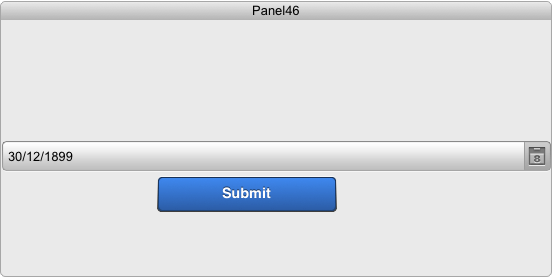
When users run a report services document on iPad against Strategy Mobile app 9.4.1, the calendar, which mapped to a transaction report, shows 12/31/1899 by default.
 
STEPS TO REPRODUCE:
  • Create a transaction report with the Day attribute.
  • Create a report services document and insert a static text box.
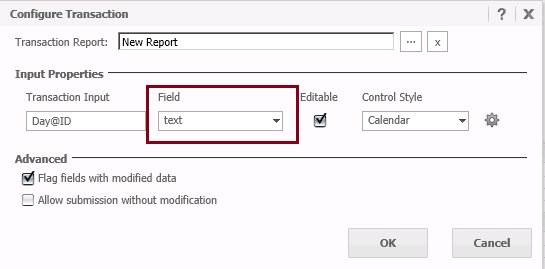
  • Configure transaction for the text and set the control type to Calendar.

ka04W000000OaaEQAS_0EM440000002A8t.png
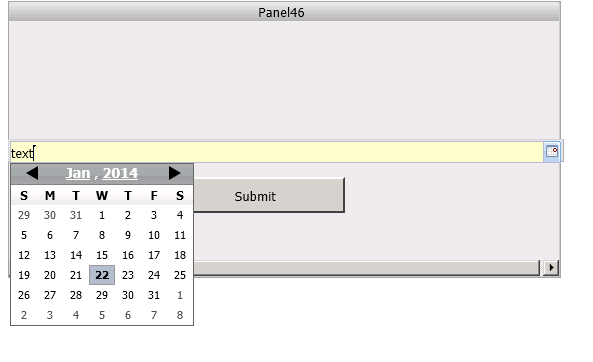
  • Run the report services document on web and click the Calendar icon. The default date is the current date which is correct.

ka04W000000OaaEQAS_0EM440000002A8n.png
  • Run the same report services document on iPad against mobile app 9.4.1. The default date is 30/12/1899.

ka04W000000OaaEQAS_0EM440000002A8p.png

CAUSE:
This is a known issue of Strategy Mobile app 9.4.1.
 
WORKAROUND:
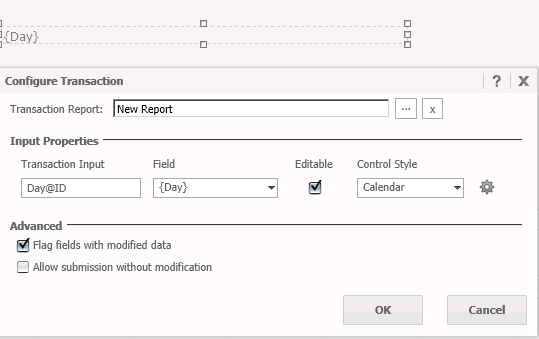
Add the Day attribute as dynamic text instead of static text. Configure transaction for the dynamic text and set the control type to Calendar.
ka04W000000OaaEQAS_0EM440000002A8r.png

Note: The workaround will set the first date in the warehouse as the default date.
 
 
KB46099


Comment

0 comments

Details

Knowledge Article

Published:

June 12, 2017

Last Updated:

December 30, 2018