EducationSoftwareStrategy.com
StrategyCommunity

Knowledge Base

Product

Community

Knowledge Base

TopicsBrowse ArticlesDeveloper Zone

Product

Download SoftwareProduct DocumentationSecurity Hub

Education

Tutorial VideosSolution GalleryEducation courses

Community

GuidelinesGrandmastersEvents
x_social-icon_white.svglinkedin_social-icon_white.svg
Strategy logoCommunity

© Strategy Inc. All Rights Reserved.

LegalTerms of UsePrivacy Policy
  1. Home
  2. Topics

KB46101: How to retain the attribute collapse/expand settings in Report objects pane in MicroStrategy Developer 9. x?


Stefan Zepeda

Salesforce Solutions Architect • Strategy


How to retain the attribute collapse/expand settings in Report objects pane in MicroStrategy Developer 9. x?

In the Report Editor, there is a Report objects pane.

ka02R000000kX6OQAU_0EM440000002CSm.png

 
Users can expand/collapse using + and - marks. However, re-opening Report Editor purges settings.
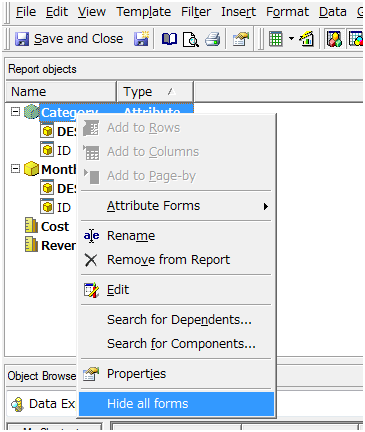
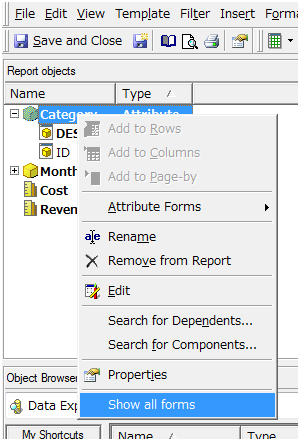
To keep the settings upon re-launching Report Editor or Developer, right mouse click on any attribute and select “Show all forms” or “Hide all forms”.
 

ka02R000000kX6OQAU_0EM440000002CSk.png


ka02R000000kX6OQAU_0EM440000002CSl.png

Comment

0 comments

Details

Knowledge Article

Published:

April 10, 2017

Last Updated:

April 10, 2017