Introduction
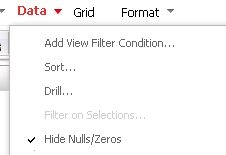
With Strategy Web, it is possible to hide data rows with zero/null values with a single click using the option: Data > Hide Nulls/Zeros, which is shown below.
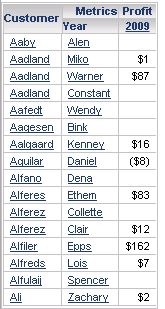
For example, consider the following report which has null values on multiple rows.
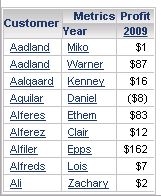
Checking the option to hide nulls/zeros hides all the null value rows on the grid as shown below.
SYMPTOM
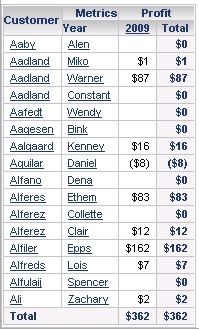
When subtotals are enabled on the report, the option to hide nulls/zeros does not seem to work. Considering the same report given in the above example, when subtotals are enabled and the option to hide nulls/zeros are checked, all the data rows are displayed on the grid and the null value rows are not hidden as shown below. Even with the VLDB setting 'Null checking for Analytical Engine' is set to False, this behavior does not change.
CAUSE
This is working as designed in Strategy. The option to hide zeros/nulls only applies to metric values and does not extend to subtotals.
ACTION
An enhancement request has been logged so that the feature to hide nulls/zeros works on grids even when subtotals are enabled. This issue is currently not scoped to be addressed in any upcoming Strategy release.
