SYMPTOM:
When checking the status of Strategy Intelligence Server from Strategy Test Listener, the status of the Strategy Intelligence Server is seen correctly, but the license key information associated to that installation is not seen as shown below.
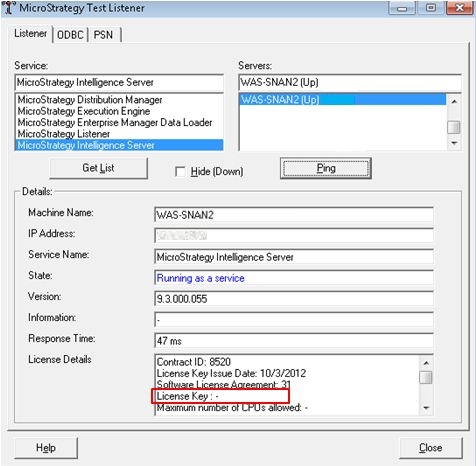
For other Strategy Intelligence Server 9.x and newer installations, the full license key is displayed through Strategy Test Listener.
CAUSE:
Strategy Test Listener gets the license key information by reading the latest entry in the Strategy installation history file (mstr.hist). If the last installation performed on the Strategy Intelligence Server machine is an installation which does not need a license key, for example, application of a Hotfix, a license key will not be present in that entry. An example entry in the mstr.hist file for a Hotfix installation is shown below:
Sample Code/Error:

Build=9.3.040.055

Release=Strategy 9.3.0 HotFix 2

Source=Hotfix

Type=First Install

Time=12:57:47

Date=2013-03-28

State=GA

Install=Strategy Intelligence Server

Install=Strategy Health Center

Install=Strategy Narrowcast Administrator

Install=Strategy SDK

Install=Strategy Command Manager

Install=Strategy Desktop Products

Install=Strategy Mobile Server (JSP)

Install=Strategy Mobile Server (ASP .NET)

Install=Strategy Web Services (J2EE)

Install=Strategy Web Services (ASP .NET)

Install=Strategy Portlets

Install=Strategy Web Server (JSP)

Install=Strategy Web Server (ASP .NET)
