EducationSoftwareStrategy.com
StrategyCommunity

Knowledge Base

Product

Community

Knowledge Base

TopicsBrowse ArticlesDeveloper Zone

Product

Download SoftwareProduct DocumentationSecurity Hub

Education

Tutorial VideosSolution GalleryEducation courses

Community

GuidelinesGrandmastersEvents
x_social-icon_white.svglinkedin_social-icon_white.svg
Strategy logoCommunity

© Strategy Inc. All Rights Reserved.

LegalTerms of UsePrivacy Policy
  1. Home
  2. Topics

KB46117: "The procedure entry point could not be located in the dynamic link library XalanMessages_1_10.dll" error message appears when trying to open MicroStrategy Analytics Desktop


Community Admin

• Strategy


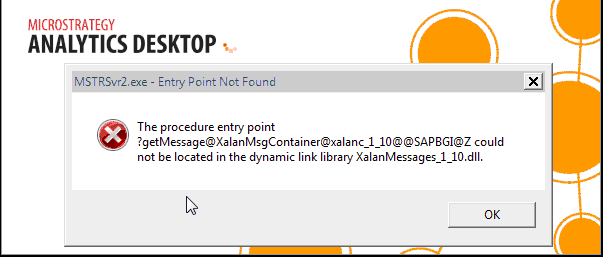
After installing MicroStrategy Analytics Desktop successfully on a machine, the user encounters the following error message when trying to open Analytics Desktop

SYMPTOM:
 
After installing Strategy Analytics Desktop successfully on a machine, the user encounters the following error message when trying to open Analytics Desktop.
 

ka04W000000OeMhQAK_0EM4400000026IN.png


The procedure entry point ?getMessage@XalanaMsgContainer@xalanc_1_10@@SAPBGI@Z">?getMessage@XalanaMsgContainer@xalanc_1_10@@SAPBGI@Z could not be located in the dynamic link library XalanMessages_1_10.dll

  
CAUSE:
 
A possible cause for the entry point error message is that another application or a previous install of Analytics Desktop had installed another version of the "XalanMessages_1_10.dll" on the machine. As there are multiple "XalanMessages_1_10.dll" files on the machine, this causes a conflict with Analytics Desktop when it is trying to access the correct dynamic link library.
 
ACTION:
 
Perform only one of the following actions to resolve the issue:

  1. Identify and remove the "XalanMessages_1_10.dll" that is causing the error.
  2. Change the environment variable path on the machine to only use the directory where the correct "XalanMessages_1_10.dll" is located.

WARNING: Users should consult their system administrator when trying these workarounds as deleting the other XalanMessages_1_10.dll or changing the environment variable path could prevent other programs that also require XalanMessages_1_10.dll on their machine from running properly.


Comment

0 comments

Details

Knowledge Article

Published:

June 12, 2017

Last Updated:

June 12, 2017