SUMMARY
This technical note describes an issue when trying to navigate through the fields of a Transaction Services document by using 'Tab' and 'Shift+Tab' keys on the keyboard and it's limited to Strategy Web 9.2.x - 9.4.1. A workaround is available and is described in this technote. A solution/code fix for this issue is not available in current releases but is being reviewed for a future Strategy release.
SYMPTOM
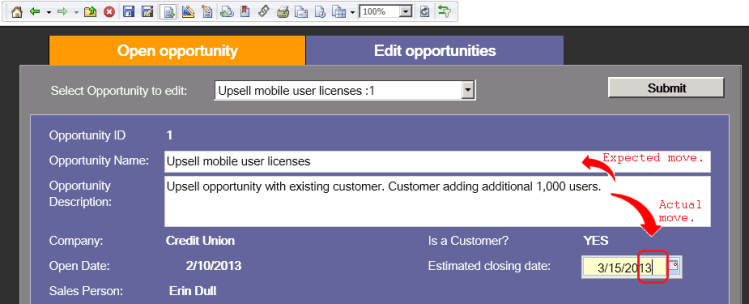
In Transaction Services enabled documents, when hitting 'shift + tab' keys on the keyboard the cursor moves forward instead of moving backwards as expected.
The issue is reproducible in Internet Explorer, Firefox and Google Chrome.
STEPS TO REPRODUCE
1. In Web, log on to the Strategy Tutorial project and run the following document \Public Objects\Reports\Strategy Platform Capabilities\Strategy Transaction Services\Opportunity Management document
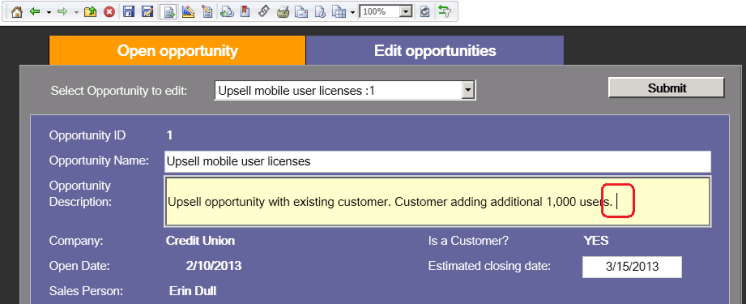
2. Position the cursor on the editable field for "Opportunity Description":
3. Hit 'shift+tab' keys on your keyboard and notice that the cursor moves to the next field ('Estimated closing date') instead of moving back to 'Opportunity Name' as expected:
CAUSE
This is a known issue in Strategy Web 9.x. A case has been logged with the technology team for further investigation.
ACTION
Contact the Strategy Technical Support for an update on this issue.
WORKAROUND
While using 'Tab' key works fine for moving the cursor forward, as a workaround for this issue, use mouse click instead of the keyboard to manually move the cursor backwards.
LEARN MORE
For related issues, refer to the following technical note:
- KB37550: Cursor does not move in the attribute list in a prompt unless you mouse click on the element each time when using Windows IE7 in MicroStrategy Web 9.0.x.
- KB46134: In Transaction Services enabled documents, when hitting ´tab´ key on the keyboard the cursor moves forward to the next report cell but its content does not get automatically highlighted in MicroStrategy Web 9.x
KB46133
