SUMARRY:
This issue is classified as a product usage question. While the interface may be misleading, there are other options for the desired result. The resolution is provided.
SYMPTOM:
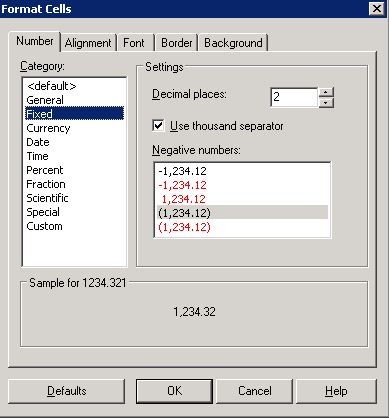
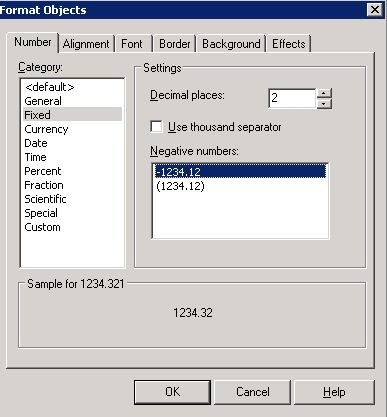
While editing a format of a text which is mapped to a metric, less variety of options found for negative numbers. As shown below, "Format Cells" give you options to show values in red while "Format Object" shows only two options - value with negative sign and the one with parentheses.
CAUSE:
This is working as designed. For text box, the formatting option is either to add negative sign (-) or wrapping the value with parentheses.
ACTION:
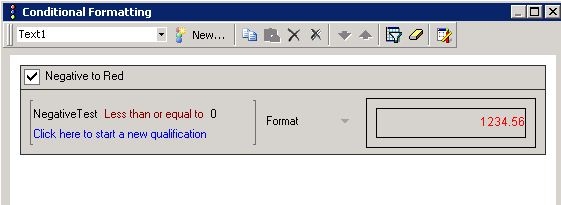
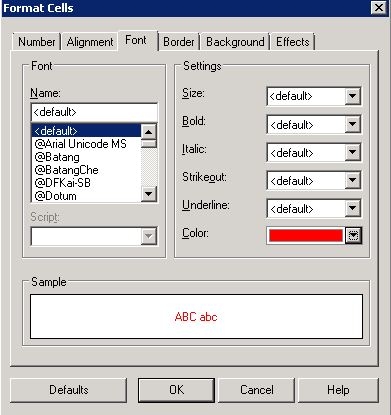
Use Conditional Formatting feature and specify that the value less than 0 should have red color as shown below:
TO LEARN MORE:
TN11941: How to use conditional formatting thresholds on individual report objects in a Strategy Report Services 8.x and 9.x document
TN17714: Negative formatting for metric does not work on a dashboard in Strategy Desktop 8.1.1
>> This limitation existed since version 8.x where the option to select red color available. Starting 9.x, the option itself became unavailable because the feature not supported.
TN33471: Custom metric values formatting shows up incorrectly for Report Services Documents in Strategy Web 9.0.x
TN10255 : How to format a metric in Strategy 9.x to allow for differences in appearance of negative and positive values
TN18449: Negative currency formatting does not work as specified in Strategy Desktop 8.x
