EducationSoftwareStrategy.com
StrategyCommunity

Knowledge Base

Product

Community

Knowledge Base

TopicsBrowse ArticlesDeveloper Zone

Product

Download SoftwareProduct DocumentationSecurity Hub

Education

Tutorial VideosSolution GalleryEducation courses

Community

GuidelinesGrandmastersEvents
x_social-icon_white.svglinkedin_social-icon_white.svg
Strategy logoCommunity

© Strategy Inc. All Rights Reserved.

LegalTerms of UsePrivacy Policy
  1. Home
  2. Topics

KB46169: The Static Subscription Set Editor menu bar in Narrowcast is stuck outside the editor and cannot be used in MicroStrategy


Community Admin

• Strategy


The menu bar in the Static Subscription Set Editor is located outside the editor when users open the editor. The menu bar cannot be placed back into the editor or used.
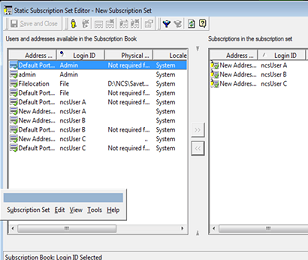
SYMPTOM:
The menu bar in the Static Subscription Set Editor is located outside the editor when users open the editor. The menu bar cannot be placed back into the editor or used.
 

ka04W000000ObLwQAK_0EM4400000029SW.png

 
CAUSE:
This happens when the menu bar is removed from the Static Subscription Set Editor and the editor is closed without placing the menu bar back into the editor.
 
ACTION:

  1. Locate the Delivery Engine folder in the Narrowcast installation directory. The default location for this directory is "C:\Program Files\MicroStrategy\Narrowcast Server\Delivery Engine".
  2. Create a new folder in the Delivery Engine folder and name it Temp.
  3. Cut and paste the following files to the newly created folder:
       Agent.tb
       SubscriptionBook.tb
       SubscriptionSet.tb
  4. The menu bar settings will go back to default.


Comment

0 comments

Details

Knowledge Article

Published:

June 2, 2017

Last Updated:

June 2, 2017