EducationSoftwareStrategy.com
StrategyCommunity

Knowledge Base

Product

Community

Knowledge Base

TopicsBrowse ArticlesDeveloper Zone

Product

Download SoftwareProduct DocumentationSecurity Hub

Education

Tutorial VideosSolution GalleryEducation courses

Community

GuidelinesGrandmastersEvents
x_social-icon_white.svglinkedin_social-icon_white.svg
Strategy logoCommunity

© Strategy Inc. All Rights Reserved.

LegalTerms of UsePrivacy Policy
  1. Home
  2. Topics

KB46177: How to create a dynamic filter that returns months less than or equal to current date in MicroStrategy Developer 9.x.?


Stefan Zepeda

Salesforce Solutions Architect • Strategy


How to create a dynamic filter that returns months less than or equal to current date in MicroStrategy Developer 9.x.?

In some business scenarios, administrative users have a calendar master table with future entries, and at the same time, they might desire to show Month elements until today. Follow the steps below to achieve this requirement. In this scenario, the Month attribute has numeric YYYYMM format.

  • Create an Attribute Qualification Filter.
ka02R000000kYESQA2_0EM440000002CSO.png
  • Month ID Less than or equal to” (Year(CurrentDate()) * 100) + Month(CurrentDate())
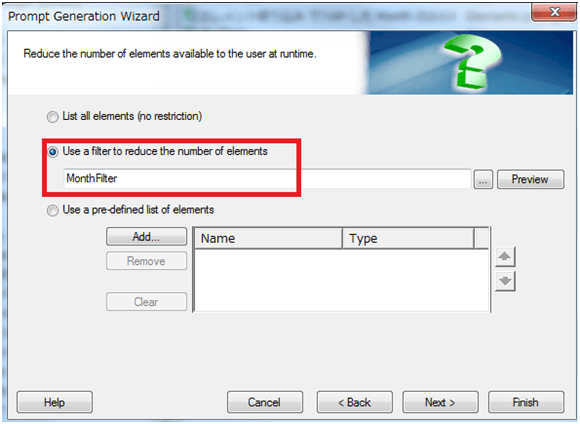
  • Create an Element Prompt with the filter created in step1.
ka02R000000kYESQA2_0EM440000002CSa.png

 
The SQL of this Element Prompt against an Oracle warehouse is as seen below:
Sql
select a11.MONTH_ID  MONTH_ID
from LU_MONTH a11
where a11.MONTH_ID <=  ((TO_NUMBER(TO_CHAR(TRUNC(CURRENT_DATE), 'YYYY')) * 100) + TO_NUMBER(TO_CHAR(TRUNC(CURRENT_DATE), 'MM')))
order by  1 desc


Comment

0 comments

Details

Knowledge Article

Published:

June 9, 2017

Last Updated:

June 9, 2017