EducationSoftwareStrategy.com
StrategyCommunity

Knowledge Base

Product

Community

Knowledge Base

TopicsBrowse ArticlesDeveloper Zone

Product

Download SoftwareProduct DocumentationSecurity Hub

Education

Tutorial VideosSolution GalleryEducation courses

Community

GuidelinesGrandmastersEvents
x_social-icon_white.svglinkedin_social-icon_white.svg
Strategy logoCommunity

© Strategy Inc. All Rights Reserved.

LegalTerms of UsePrivacy Policy
  1. Home
  2. Topics

KB46185: "Invalid property specified in the list. Task(s) execution completed with errors." error message appears when executing "LIST NAME FOR USER 'XXX' " outline in MicroStrategy Command Manager 9.x.


Community Admin

• Strategy


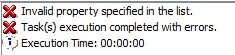
In MicroStrategy Command Manager 9.x, when executing the script syntax "LIST NAME FOR USER "XXX"", the following error message appears.
SYMPTOM:
 
In Strategy Command Manager 9.x, when executing the script syntax "LIST NAME FOR USER "XXX"", the following error message appears.
 

ka04W000000OcaGQAS_0EM440000002CSE.png


Invalid property specified in the list.
Task(s) execution completed with error.
Execution Time: 00:00:00

 
STEPS TO REPRODUCE:
 

  1. Open Strategy Command Manager 9.4.1 and connect to the Strategy Analytics Module
  2. Type script "LIST NAME FOR USER "csmith";" to display the username of the user "csmith" 
  3. "Invalid property specified in the list.Task(s) execution completed with errors." error message received.

 
CAUSE:
 
Starting Strategy Command Manager 9.x, the syntax to list username of an user is "LOGIN" instead of "NAME".
 
ACTION:
 
Replace "NAME" parameter with "LOGIN" in the script to list the username of an user. This still applies in Strategy 10.x


Comment

0 comments

Details

Knowledge Article

Published:

May 2, 2017

Last Updated:

May 2, 2017