SYMPTOM:
The user is trying to use variable INTELLIGENCE_CUBES_RESULT_SET in Command Manager procedure to get intelligent cubes directory of all projects. But it is unable to pass the code check due to error message below:
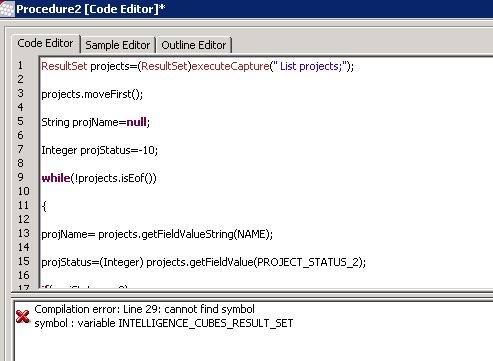
"Compilation error: Line 15: cannot find symbol
symbol : variable INTELLIGENCE_CUBES_RESULT_SET"
Sql
ResultSet projects=(ResultSet)executeCapture(" List projects;");
projects.moveFirst();
String projName=null;
Integer projStatus=-10;
while(!projects.isEof())
{
projName= projects.getFieldValueString(NAME);
projStatus=(Integer) projects.getFieldValue(PROJECT_STATUS_2);
if(projStatus==0)
{
ResultSet projproperties=executeCapture("LIST ALL PROPERTIES FOR PROJECT CONFIGURATION IN PROJECT \""+projName+"\" ;");
projproperties.moveFirst();
if(!projproperties.isEof())
{
ResultSet CubeInfo=(ResultSet) projproperties.getFieldValue(INTELLIGENCE_CUBES_RESULT_SET);
String PathInfo= CubeInfo.getFieldValueString(INTELLIGENT_CUBE_FILE_DIR);
printOut(projName+" Intelligence Cube Path---->"+ PathInfo);

}

}
projects.moveNext();
}
CAUSE:
This is a known issue in Strategy Command Manager 9.3.x and 9.4.x
ACTION:
Use “INTELLIGENT_CUBES_RESULT_SET” instead of “INTELLIGENCE_CUBES_RESULT_SET” when try to get the intelligent cubes directory of all projects.
