In some business scenarios, it is required to configure at Strategy side if the password for MS SQL databases used as metadata database and warehouse database are modified. Specifically, standard authentication (user name and password) is used for MS SQL databases. Below steps introduce how to configure it.
For the MS SQL metadata database (used in a 3-tier project source):
After the user password for the MS SQL database was changed, user may still be able to login to a 3-tier project source. But error may display when user tries to access the metadata to perform some actions, like trying to expand User Manager as following:
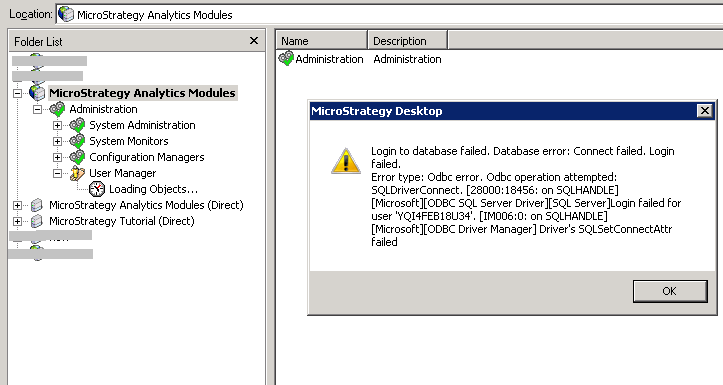
Sample Code/Error
Login to database failed. Database error: Connect failed. Login failed.
Error type: Odbc error. Odbc operation attempted: SQLDriverConnect.
As DSN of MS SQL databases does not save database password, user needs to re-configure the intelligence server with the new database password specified.
For the MS SQL metadata database (used in a 2-tier project source):
Right click the project source, and choose "Modify project source". In the launched dialog box, specify the new password as following:

For the MS SQL warehouse database:
Login information as specified in Database Instance needs to be modified accordingly.
Go to “Administration” -> “Configuration Managers” -> “Database Instances”, use the "Tutorial Data" database instance here as an example:

Third Party Software Installation WARNING
The third-party product(s) discussed in this technical note is manufactured by vendors independent of Strategy. Strategy makes no warranty, express, implied or otherwise, regarding this product, including its performance or reliability.
