SYMPTOM:
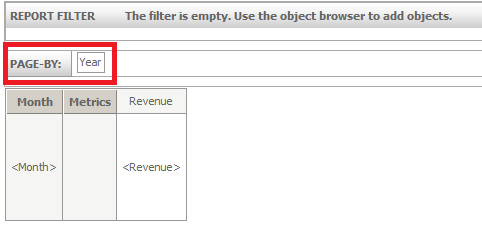
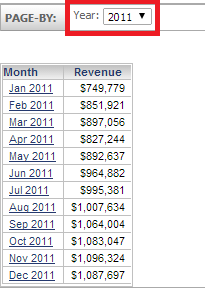
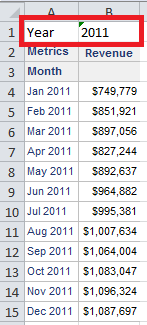
In Strategy Web 9.4.1, a user can change a default page-by selection for a report and save the report, and when the user opens this report again, the page-by selection will be retained. The user can then run this report to an Excel grid in Strategy Office 9.4.1 and the page-by will be applied there, as well. However, if the user changes the default page-by selection in Strategy Web or Developer, saves it, and refreshes the Excel grid, this new change will not be applied.
STEPS TO REPRODUCE:
Follow these steps to reproduce this issue in the Strategy Tutorial project.
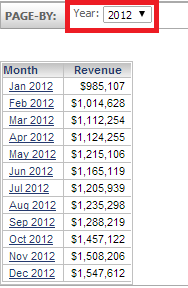
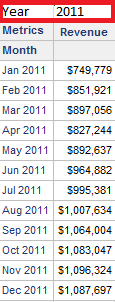
CAUSE:
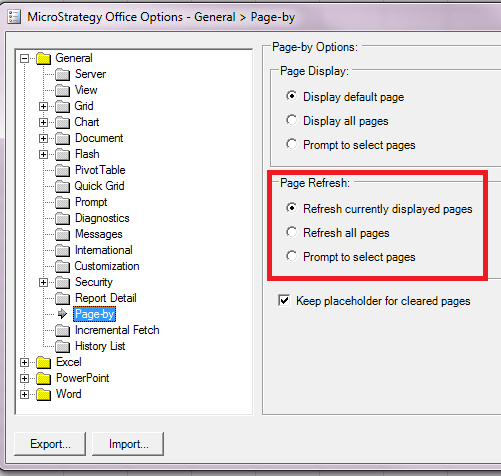
This is currently working as designed. In the Strategy Office options > Page-by > Page Refresh, the default option selected is: Refresh Currently displayed pages.
Strategy Office treats each page-by element in a report as a separate Excel sheet. When the user accesses the "Reports" window from the Strategy Office Toolbar, the report is actually stored with the Page/Layout description, in this case 2011. When the user changes the default page-by and refreshes the excel workbook, the call is still going out to refresh only the data for the specific report and for the specific page-by, or the "Currently displayed page", thus no change in the page-by is experienced. A request has been logged for the ability for Strategy Office to synchronize the report's default page-by setting with that of the report definition.
ACTION:
Contact Strategy Technical Support for an update on this issue.
WORKAROUND:
In Strategy Office 9.4.1, go to Options > General > Page-by, and modify the Page Refresh setting to "Refresh all pages" or "Prompt to select pages" in order to see the other page-by elements when refreshing the workbook, as shown below.