EducationSoftwareStrategy.com
StrategyCommunity

Knowledge Base

Product

Community

Knowledge Base

TopicsBrowse ArticlesDeveloper Zone

Product

Download SoftwareProduct DocumentationSecurity Hub

Education

Tutorial VideosSolution GalleryEducation courses

Community

GuidelinesGrandmastersEvents
x_social-icon_white.svglinkedin_social-icon_white.svg
Strategy logoCommunity

© Strategy Inc. All Rights Reserved.

LegalTerms of UsePrivacy Policy
  1. Home
  2. Topics

KB46290: "Run subscription immediately" in Desktop does not trigger an email subscription.


Community Admin

• Strategy


"Run subscription immediately" in Desktop does not trigger an email subscription in MicroStrategy 9.4.1.

SYMPTOM:
 
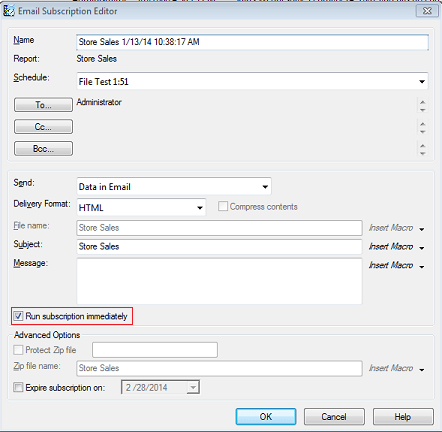
When a user checks the "Run subscription immediately" option in the Email Subscription Editor, the subscription does not get triggered. This issue is only seen with email subscriptions.
 
STEPS TO REPRODUCE:
  • Log into Strategy Desktop as Administrator.
  • Navigate to Administration > Configuration Manager > Schedules.
  • Right Click on a schedule and select "Search for dependent subscriptions".
  • Right click on a subscription and select "Edit".
  • In the Email Subscription Editor window select "Run subscription immediately" and click "OK".
     
ka04W000000Oe2lQAC_0EM4400000029Sd.png
  • The user will notice that the email subscription was not triggered as the email was never delivered. 

CAUSE:
 
This is a known issue in Strategy 9.4.1. There are no errors associated with the issue that are logged to the DSSErrors.log. The issue can be reproduced on demand following the steps provided above.
 
ACTION:
 
 
This issue has been addressed in Strategy Secure Enterprise 10.0 and above. In this version it is no longer possible to Edit email subscriptions from Strategy Developer. Please upgrade to this version to take advantage of this fix.
 
The internal issue ID discussed in this technical note is DE29170


Comment

0 comments

Details

Knowledge Article

Published:

April 1, 2017

Last Updated:

April 1, 2017