EducationSoftwareStrategy.com
StrategyCommunity

Knowledge Base

Product

Community

Knowledge Base

TopicsBrowse ArticlesDeveloper Zone

Product

Download SoftwareProduct DocumentationSecurity Hub

Education

Tutorial VideosSolution GalleryEducation courses

Community

GuidelinesGrandmastersEvents
x_social-icon_white.svglinkedin_social-icon_white.svg
Strategy logoCommunity

© Strategy Inc. All Rights Reserved.

LegalTerms of UsePrivacy Policy
  1. Home
  2. Topics

KB46295: "Failed to load DLL: MASetup" error message appears when installing MicroStrategy Analytics Enterprise 9.4.1 on Windows XP


Community Admin

• Strategy


This KB addresses an error encountered when installing MicroStrategy Analytics Enterprise 9.4.1 on Windows XP.

SYMPTOM:
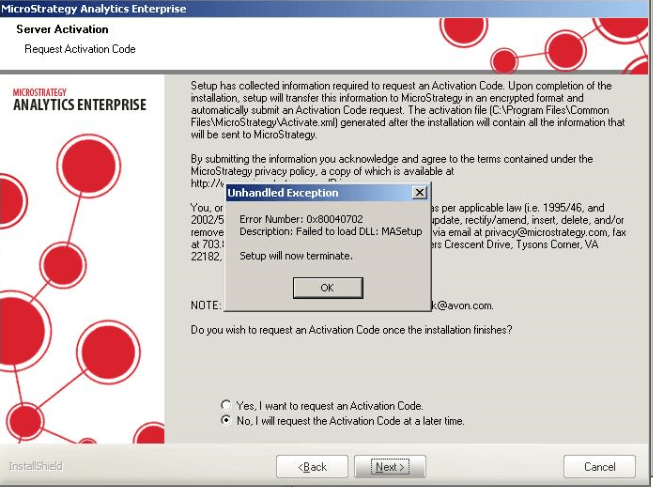
When installing Strategy Analytics Enterprise 9.4.1 on Windows XP, the error "Failed to Load DLL: MASetup" is encountered as shown below. The error is seen after requesting an activation code in the Installation Wizard.
ka04W000001MKtfQAG_0EM440000002HIl.jpeg


Error Number: 0x80040702
Description: Failed to load DLL: MASetup

Setup will now terminate.

 
CAUSE:
Windows XP is not a supported operating system for Strategy Analytics Enterprise 9.4.1.
ACTION:
Install Strategy Analytics Enterprise 9.4.1 on a supported operating system. Refer to the following Strategy Knowledge Base article for details on supported operating systems:
KB45065 - Strategy Analytics 9.4.1 Product Suite Readmes and Release Notes


Comment

0 comments

Details

Knowledge Article

Published:

April 4, 2017

Last Updated:

April 4, 2017