SYMPTOM:
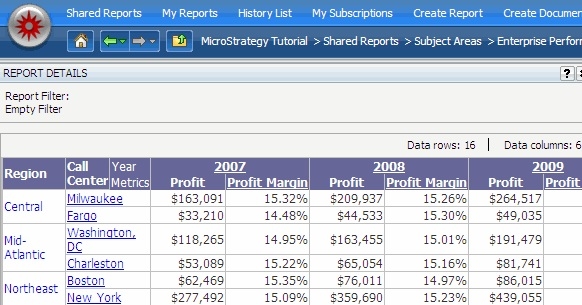
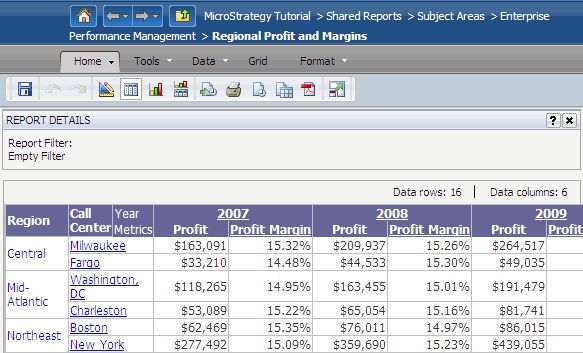
Prior to Strategy Web 9.3.0, a user could use the URL API parameter '&hiddenSections=header' to hide the header section of the Strategy Web page, like shown below.
With the header section:
Without the header section:
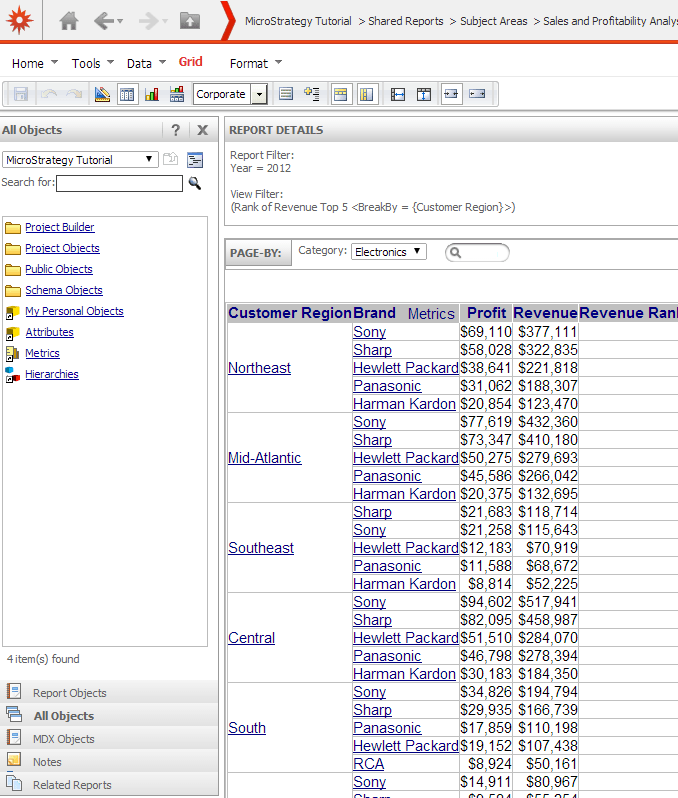
Starting Strategy Web 9.3.0, when adding the parameter '&hiddenSections=header' to a URL, the header section is still visible as seen in the below image.
CAUSE:
This is working as designed in Strategy Web 9.3.x The following image would describe the different sections of a Strategy page prior to Strategy Web 9.3.x:
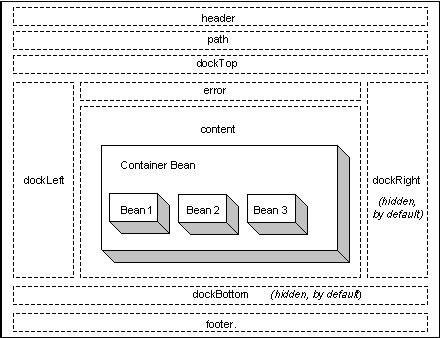
Under this scenario, the "Header" section is described as the section that contains information to be displayed at the top of the page such as logos, navigational links (for example, Shared Reports or My Reports), search box, and so on. And the "Path" section is described as the section that contains navigational information for the application.
Note: Refer to the following MSDL article for more information on this.
https://resource.microstrategy.com/MSDZ/MSDL/AnalyticsEnterprise/docs/mergedProjects/websdk/topics/pagecontent/Page_Sections.htm?zoom_highlight=header+docktop
However, starting Strategy Web 9.3.0 when the interface was redesigned, the content of both sections, header and path, displays in the same page section. Thus, when adding the parameter '&hiddenSections=header' to the URL nothing happens.
ACTION:
Use the following parameter instead of 'header'. This parameter will hide the section that displays the content of both the header and the path sections:
&hiddenSections=path
