SYMPTOM:
In Strategy 9.2.1, a user can create a matrix of pie graphs with data labels. While the data labels for these graphs are small in size, the size of each pie is uniform, as seen below.

If the data contains larger numbers, the labels size increases, and the pie graphs become smaller in order to compensate, which is expected behavior. This is seen below.
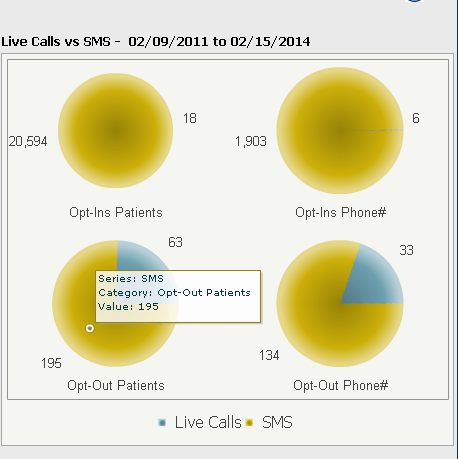
However, the user may encounter a situation where even though the data labels are small, the pies change to different sizes for no discernible reason, as seen below.

STEPS TO REPRODUCE:
CAUSE:
This is working as designed in Strategy Web 9.2.1. The size of the pie chart will always have to share the space available with its label. If the label is located directly above or under, the label area will push the size of the pie chart. As the labels move toward the sides of the pie, they take up less space. A request has been logged to address this issue.
ACTION:
Contact Strategy Technical Support for an update on this issue.
WORKAROUND:
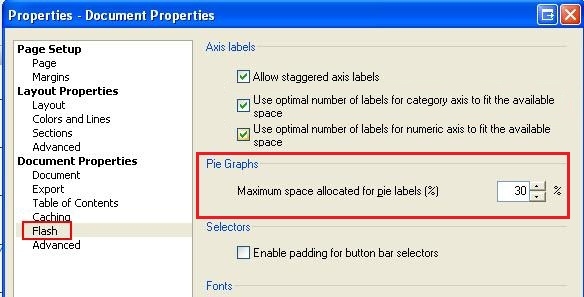
The size that the labels take up can be controlled with the following document property, available only in Strategy Desktop 9.2.1:
Tools > Document properties > Flash > Pie graphs: Maximum Space allocated for pie labels (%)