EducationSoftwareStrategy.com
StrategyCommunity

Knowledge Base

Product

Community

Knowledge Base

TopicsBrowse ArticlesDeveloper Zone

Product

Download SoftwareProduct DocumentationSecurity Hub

Education

Tutorial VideosSolution GalleryEducation courses

Community

GuidelinesGrandmastersEvents
x_social-icon_white.svglinkedin_social-icon_white.svg
Strategy logoCommunity

© Strategy Inc. All Rights Reserved.

LegalTerms of UsePrivacy Policy
  1. Home
  2. Topics

KB46322: URL API to open a specific panel from a panel stack using the panel name doesn’t work properly in MicroStrategy Mobile 9.4.x and later


Community Admin

• Strategy


URL API to open a specific panel from a panel stack using the panel name doesn’t work properly in MicroStrategy Mobile 9.4.x and later

SYMPTOM:
In Strategy Mobile 9.4.x and above, users will not be able to execute a link configured to open a certain panel in a panel stack after changing the panel name in Strategy Web 9.2.x and higher versions.
Refer to TN40581 "How to use Mobile URL API to display a certain panel in a panel selector in MicroStrategy Mobile 9.2.1m" for more information on how to configure URL API to change panels in Strategy Mobile.
 
STEPS TO REPRODUCE:

  1. Create a document in Strategy Web 9.4.x and later
  2. In the detail header, insert a panel stack and rename it to “MyPanelStack”
  3. Add one more panel so that there are a total of two, and rename them to “BluePanel” and “YellowPanel”
  4. Insert a text box inside the YellowPanel and use edit links to set the URL API with the following:

     
    Sample Code/Error
    mstr://?evt=2048076&psName=MyPanelStack&pName=BluePanel

     
  5. Insert a text box inside the BluePanel and use edit links to set the URL API with the following:

     
    Sample Code/Error
    mstr://?evt=2048076&psName=MyPanelStack&pName=YellowPanel

     
  6. Save the document.
  7. Run the document on Mobile and tap on the links in each panel. Note that the link is not responsive and the panel is not changed. 

CAUSE:
This is a known issue where changing panel names in Strategy Web 9.4.x and above will not be reflected in the Metadata.
 
ACTION:
Contact Strategy Technical Support for the latest update of this issue.
 
WORKAROUND:
Use Strategy Developer 9.4.x or later to change the panel name in a panel stack.
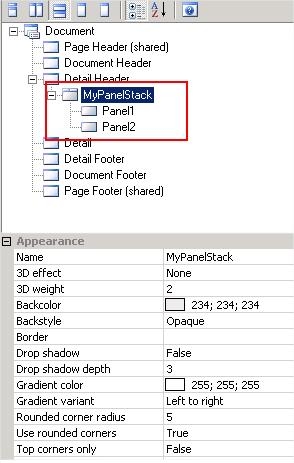
  • In desktop, browse to the desired document and edit it.
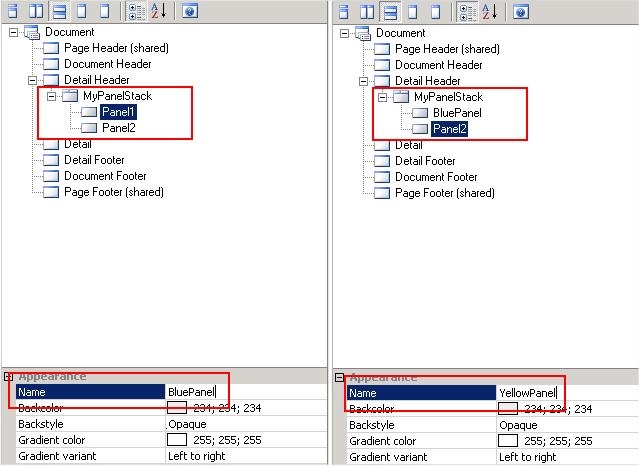
  • Choose “Property List” on the left corners and then choose “document structure on top” to display both the document structure and appearance
  • In the document structure, notice that the panel stack name is replaced with “MyPanelStack”. However, the panel name still shows as “Panel##” instead of “BluePanel” or “YellowPanel"

ka04W000000OdYNQA0_0EM4400000026HQ.jpeg
  • Change the panel name in “Appearance” to BluePanel and YellowPanel accordingly

    .
ka04W000000OdYNQA0_0EM4400000026HS.jpeg
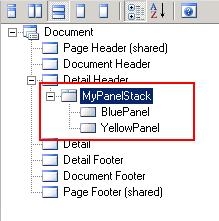
  • Notice that the changes in the panel names will reflect correctly.

ka04W000000OdYNQA0_0EM4400000026HN.jpeg
  • Save the document.

This information will now be updated in the metadata. The next time the document is run in Mobile, the link will be responsive and should open the respective panel.
NOTE:
The URL API event 2048076 to open a panel inside a panel stack is only available in Strategy Mobile 9.4.x and later versions


Comment

0 comments

Details

Knowledge Article

Published:

April 12, 2017

Last Updated:

April 12, 2017