EducationSoftwareStrategy.com
StrategyCommunity

Knowledge Base

Product

Community

Knowledge Base

TopicsBrowse ArticlesDeveloper Zone

Product

Download SoftwareProduct DocumentationSecurity Hub

Education

Tutorial VideosSolution GalleryEducation courses

Community

GuidelinesGrandmastersEvents
x_social-icon_white.svglinkedin_social-icon_white.svg
Strategy logoCommunity

© Strategy Inc. All Rights Reserved.

LegalTerms of UsePrivacy Policy
  1. Home
  2. Topics

KB46334: New feature in MicroStrategy Web 9.4.1 HF2: Attribute Mode for the ESRI Map widget and Visualization.


Community Admin

• Strategy


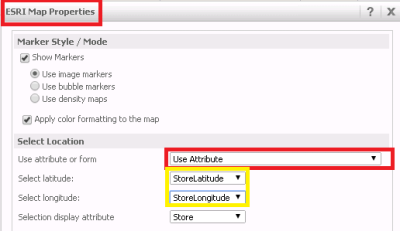
In MicroStrategy Web 9.4.1 HF2 a new feature was introduced that allows MicroStrategy Web developers to use different attributes for latitude and longitude when building ESRI Map widgets in Flash Mode and visualizations.

In Strategy Web 9.4.1 HF2 a new feature was introduced that allows Strategy Web developers to use different attributes for latitude and longitude when building ESRI Map widgets in Flash Mode and visualizations as shown below:
 

ka04W000000OaZHQA0_0EM4400000026Gx.png

Attribute Mode will only be available for Report Services Documents executed in Flash Mode.
 
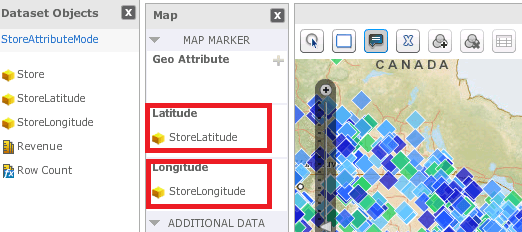
In Visual Insight dashboards users will now be available to place attributes in the latitude and longitude drop-zone to display points as shown below:
 

ka04W000000OaZHQA0_0EM4400000026Gw.png

 
In summary, there are two modes that can be used with Map with Areas in Strategy Web 9.4.1 HF2 and above:
-Attribute Mode: One attribute for latitude and one attribute for longitude.
-Attribute Form Mode: One attribute contains one form for longitude and one form for latitude. 
 
Note: The modes mentioned above are only applicable to ESRI Cloud configurations.


KB46334


Comment

0 comments

Details

Knowledge Article

Published:

March 30, 2017

Last Updated:

November 16, 2018