EducationSoftwareStrategy.com
StrategyCommunity

Knowledge Base

Product

Community

Knowledge Base

TopicsBrowse ArticlesDeveloper Zone

Product

Download SoftwareProduct DocumentationSecurity Hub

Education

Tutorial VideosSolution GalleryEducation courses

Community

GuidelinesGrandmastersEvents
x_social-icon_white.svglinkedin_social-icon_white.svg
Strategy logoCommunity

© Strategy Inc. All Rights Reserved.

LegalTerms of UsePrivacy Policy
  1. Home
  2. Topics

KB4634: How to format a metric to make the dollar sign ($) appear aligned in MicroStrategy


Stefan Zepeda

Salesforce Solutions Architect • Strategy


How to format a metric to make the dollar sign ($) appear aligned in MicroStrategy

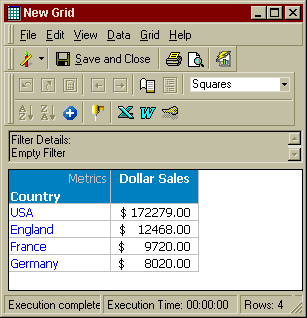
The default metric formatting for currency, displays the dollar sign ($) on the metric without being aligned (two spaces to the left of the first unit).
 

ka02R000000kYFEQA2_0EM440000002GHv.gif


ka02R000000kYFEQA2_0EM440000002GHz.gif

 
To align the dollar signs on the report, edit the metric format by selecting 'Custom' and entering '_($* 0.00_);'.
 

ka02R000000kYFEQA2_0EM440000002GHy.gif


ka02R000000kYFEQA2_0EM440000002GHw.gif


Comment

0 comments

Details

Knowledge Article

Published:

June 9, 2017

Last Updated:

June 9, 2017