EducationSoftwareStrategy.com
StrategyCommunity

Knowledge Base

Product

Community

Knowledge Base

TopicsBrowse ArticlesDeveloper Zone

Product

Download SoftwareProduct DocumentationSecurity Hub

Education

Tutorial VideosSolution GalleryEducation courses

Community

GuidelinesGrandmastersEvents
x_social-icon_white.svglinkedin_social-icon_white.svg
Strategy logoCommunity

© Strategy Inc. All Rights Reserved.

LegalTerms of UsePrivacy Policy
  1. Home
  2. Topics

KB46340: Rows with empty attribute forms are not being displayed in Outline grid view in MicroStrategy Web 9.3.1


Community Admin

• Strategy


Rows with empty attribute forms are not being displayed in outline grid view in MicroStrategy Web 9.3.1 Hotfix 4. The same grid data can be displayed correctly in normal grid view in report services document.

SYMPTOM:
 
Rows with empty attribute forms are not being displayed in outline grid view in Strategy Web 9.3.1 Hotfix 4. The same grid data can be displayed correctly in normal grid view in report services document.
 
STEPS TO REPRODUCE:
  • Create a document with 'Year', 'Employee@First', 'Employee@Last' and 'Profit'.
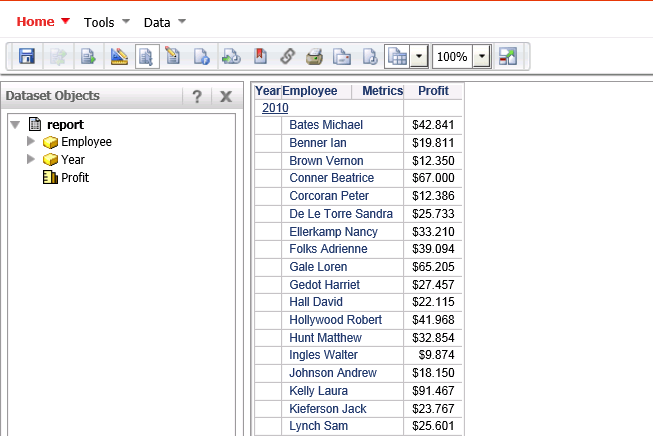
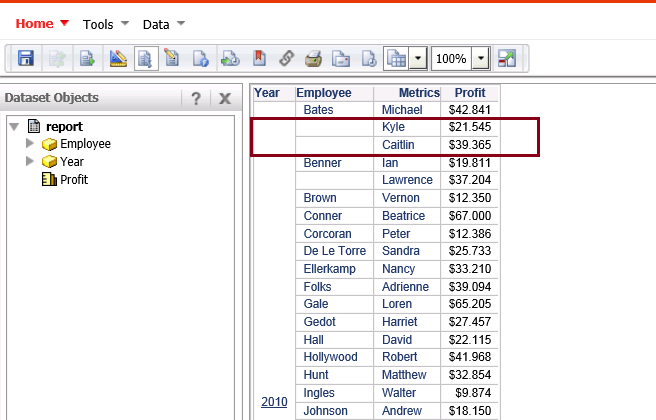
  • In the normal grid view, all the data, including rows with empty attribute forms, are returned.
     
ka04W000000ObdUQAS_0EM4400000026HR.png
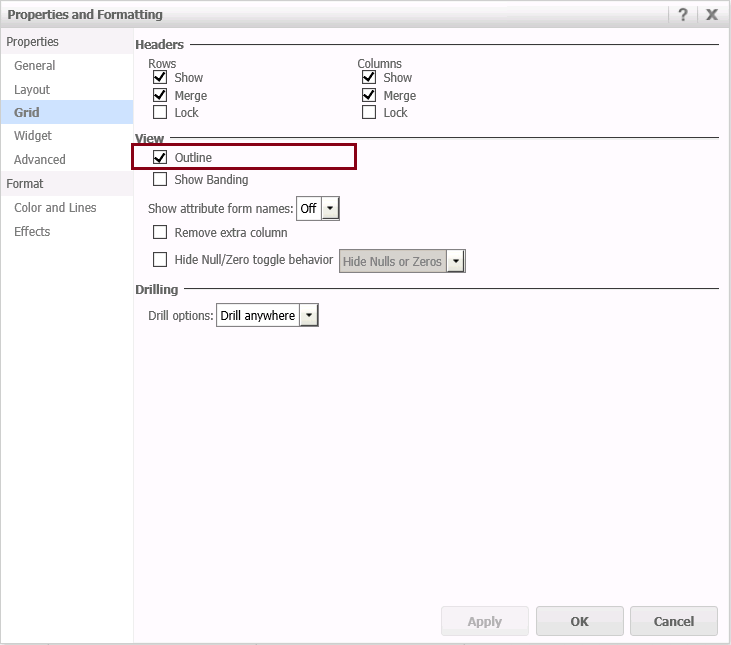
  • Enable Outline for the grid.
     
ka04W000000ObdUQAS_0EM4400000026HP.png
  • Run the report services document again. The rows with blank data for 'Emloyee@FirstName' are not displayed.
     
ka04W000000ObdUQAS_0EM4400000026HM.png

 
CAUSE:
 
This is a known issue of Strategy Web 9.3.1 and 9.4.1.
 
ACTION:
 
This issue has been addressed with Strategy 10.x. Upgrade to take advantage of the fix.


Comment

0 comments

Details

Knowledge Article

Published:

May 25, 2017

Last Updated:

May 25, 2017