SUMMARY
This issue has been classified as a defect by Strategy. The impact is limited to Strategy System Manager 9.3.x and 9.4.x product only with passing parameters with empty values. Currently no workaround is available. A solution/code fix for this issue is not available in current releases but is being reviewed for a future Strategy release.
SYMPTOM
In the 'Execute System Manager Workflow' process, when passing parameters without value to the 'Use Console Parameters' property the work flow will fail to execute with following error message:
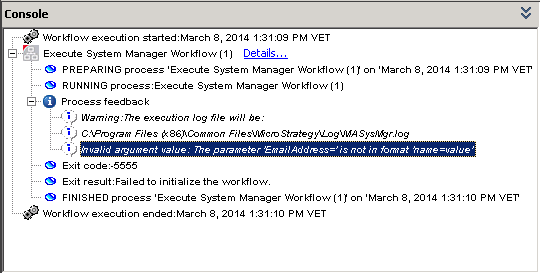
Sample Code/Error
Process feedback
Warning:The execution log file will be:
C:\Program Files (x86)\Common Files\MicroStrategy\Log\MASysMgr.log
Invalid argument value: The parameter 'xxxxxxxxxx=' is not in format 'name=value'
Exit code:-5555
Exit results:Failed to initialize the work flow.
STEPS TO REPRODUCE
1. In System manager, open the out-of-the-box work flow 05IntelligenceServerAvailability.smw;
2. Create a parameter named EmailAddress with empty value;
3. In both Send Emailprocesses, enable the "Cc:" property and include the parameter created in step 2 as below:

4. Save this work flow and create a new one from scratch;
5. In the new workflow, add a Execute System Manager work flowprocess to the work flow canvas and set it to execute the work flow from step 1;
6. Enable the Use Console Parameters property and include the console parameter name and value created in step 2 as in the image below:

7. Execute the newly created work flow and notice that it will fail.
CAUSE
This is a known issue in Strategy System Manager 9.3.x and 9.4.x. A case has been logged with the Technology Team for further investigation.
ACTION
Contact the Strategy Technical Support for an update on this issue.
ADDITIONAL TROUBLESHOOTING
For further troubleshooting following log files / information would be necessary:
LEARN MORE
For further reference on Strategy System Manager, check the following:
