EducationSoftwareStrategy.com
StrategyCommunity

Knowledge Base

Product

Community

Knowledge Base

TopicsBrowse ArticlesDeveloper Zone

Product

Download SoftwareProduct DocumentationSecurity Hub

Education

Tutorial VideosSolution GalleryEducation courses

Community

GuidelinesGrandmastersEvents
x_social-icon_white.svglinkedin_social-icon_white.svg
Strategy logoCommunity

© Strategy Inc. All Rights Reserved.

LegalTerms of UsePrivacy Policy
  1. Home
  2. Topics

KB46346: "Cannot obtain the existing Server Definitions" error message appears when configuring the Intelligence server with the Administrator account in MicroStrategy Configuration Wizard 9.x and 10.x


Community Admin

• Strategy


When configuring the Intelligence Server using the Administrator account in MicroStrategy Configuration Wizard 9.x and 10.x, the user may encounter the error, "Cannot obtain the existing Server Definitions."

SYMPTOM:
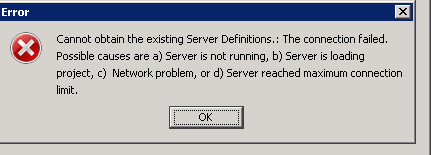
When configuring the Intelligence Server using the Administrator account in Strategy Configuration Wizard 9.x and 10.x, the user may encounter the error below:
ka04W000000Oh3MQAS_0EM4400000029SN.png


Cannot obtain the existing Server Definitions.: The connection failed. Possible causes are a) Server is not running, b) Server is loading project, c) Network problem, or d) Server reached maximum connection limit.

  
CAUSE:
One of the possible causes for this issue is "Administrator" user object is somehow corrupted.
ACTION:
Migrate the Administrator user in Strategy Tutorial metadata to the metadata experiencing the problem and replace the problematic Administrator user.


Comment

0 comments

Details

Knowledge Article

Published:

June 5, 2017

Last Updated:

June 5, 2017