EducationSoftwareStrategy.com
StrategyCommunity

Knowledge Base

Product

Community

Knowledge Base

TopicsBrowse ArticlesDeveloper Zone

Product

Download SoftwareProduct DocumentationSecurity Hub

Education

Tutorial VideosSolution GalleryEducation courses

Community

GuidelinesGrandmastersEvents
x_social-icon_white.svglinkedin_social-icon_white.svg
Strategy logoCommunity

© Strategy Inc. All Rights Reserved.

LegalTerms of UsePrivacy Policy
  1. Home
  2. Topics

KB46350: "Request timeout" error message appears when attempting to connect to a MongoDB warehouse using the unicode 32-bit MySQL ODBC Driver with MicroStrategy Analytics Desktop 9.4.1.3.


Benjamin Reyes

Vice President, Product Management • MicroStrategy


"Request timeout" error message appears when attempting to connect to a MongoDB warehouse using the unicode 32-bit MySQL ODBC Driver with MicroStrategy Analytics Desktop 9.4.1.3.

Description

The Strategy Analytics Desktop User Guide, included with a Strategy Analytics Desktop installation, states that MongoDB 2.4 is supported as a warehouse if a DSN is used to connect.

ka02R000000g2rpQAA_0EM4400000026Gl.png
ka02R000000g2rpQAA_0EM4400000026GZ.png

 
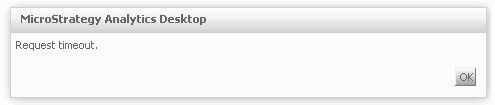
However, when attempting to use a DSN configured with the MySQL ODBC Driver 5.2.5, a request timeout is observed in Analytics Desktop:
ka02R000000g2rpQAA_0EM4400000026GY.png


Why is this happening?

The MySQL ODBC driver is not the correct driver to connect to MongoDB warehouses. The user guide shipped with 9.4.1.4 has been corrected.
 

Solution

The correct driver for MongoDB 2.4 is "32-bit Simba MongoDB ODBC Driver 0.04.x".
The files to install this driver need to be obtained from SimbaLabs, the MongoDB developers. 
After the driver has been installed and a DSN has been created, this DSN can be used through a "Generic DBMS" object in Analytics Desktop:

ka02R000000g2rpQAA_0EM4400000026Gi.png


Comment

0 comments

Details

Knowledge Article

Published:

May 31, 2017

Last Updated:

September 20, 2019