EducationSoftwareStrategy.com
StrategyCommunity

Knowledge Base

Product

Community

Knowledge Base

TopicsBrowse ArticlesDeveloper Zone

Product

Download SoftwareProduct DocumentationSecurity Hub

Education

Tutorial VideosSolution GalleryEducation courses

Community

GuidelinesGrandmastersEvents
x_social-icon_white.svglinkedin_social-icon_white.svg
Strategy logoCommunity

© Strategy Inc. All Rights Reserved.

LegalTerms of UsePrivacy Policy
  1. Home
  2. Topics

KB46365: How to format metric values with a text pattern in MicroStrategy Web 9.4.1 and above


Community Admin

• Strategy


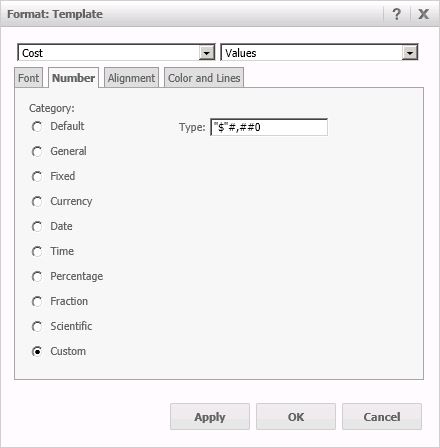
When formatting values of metric in Strategy Web 9.4.1 and newer versions, there are many categories to be chosen in the Number tab, as shown:
ka04W000001MKnMQAW_0EM4400000026Fy.jpeg

 
To insert text in the formatting, select the Custom option, so add the desired text between quotation marks (“”), see some examples below:
 

Format

Cell data

Display

"Sales="0.0

123.45

Sales=123.5

"X="0.0;"x="-0.0

-12.34

x=-12.3

"Cust. No. " 0000

1234

Cust. No. 1234

0 “Years”

30

30 Years


NOTE:
For a more comprehensive list and more detailed information consult the following product manuals:

  • Advanced Reporting Guide, Chapter 7 Designing Reports, section Formatting a report
  • Project Design Guide, Appendix C. Data Types

As these references might change from version to version contact Strategy Technical Support in case of doubt. The referenced guides above were based on the Strategy Analytics Enterprise 9.4.1 version.


Comment

0 comments

Details

Knowledge Article

Published:

April 7, 2017

Last Updated:

April 7, 2017